 OpenCode
68a9071cf1
OpenCode
68a9071cf1
Local branch had diverged from origin/master (sibling commits on the same base). Rewrote local history linearly on top of origin/master, folding in all local content: exa/hot-platform discovery hunters, leaks ledger, nightly sweep orchestrator, updated .gitignore and skill docs, plus the latest hunt output and vault state. Remote-only files (vault keys, channel scripts) were restored rather than dropped, so the resulting tree is a full union of both sides.
1 line
5.8 KiB
JSON
1 line
5.8 KiB
JSON
{"repo": "atrainag/autosentou", "files": {"README.md": {"69c75d9669cb42013917491c77e5958820d136fd": {"t": 1786068582.3753495, "n": 5539, "h": "924790372e9074a4", "c": "# Autosentou - Automated Penetration Testing Platform\n\nAutosentou is an intelligent, AI-powered automated penetration testing platform that streamlines security assessments and generates comprehensive security reports. It combines traditional penetration testing tools with modern AI/RAG capabilities to provide enhanced vulnerability analysis and remediation recommendations.\n\n## Demo\n\n[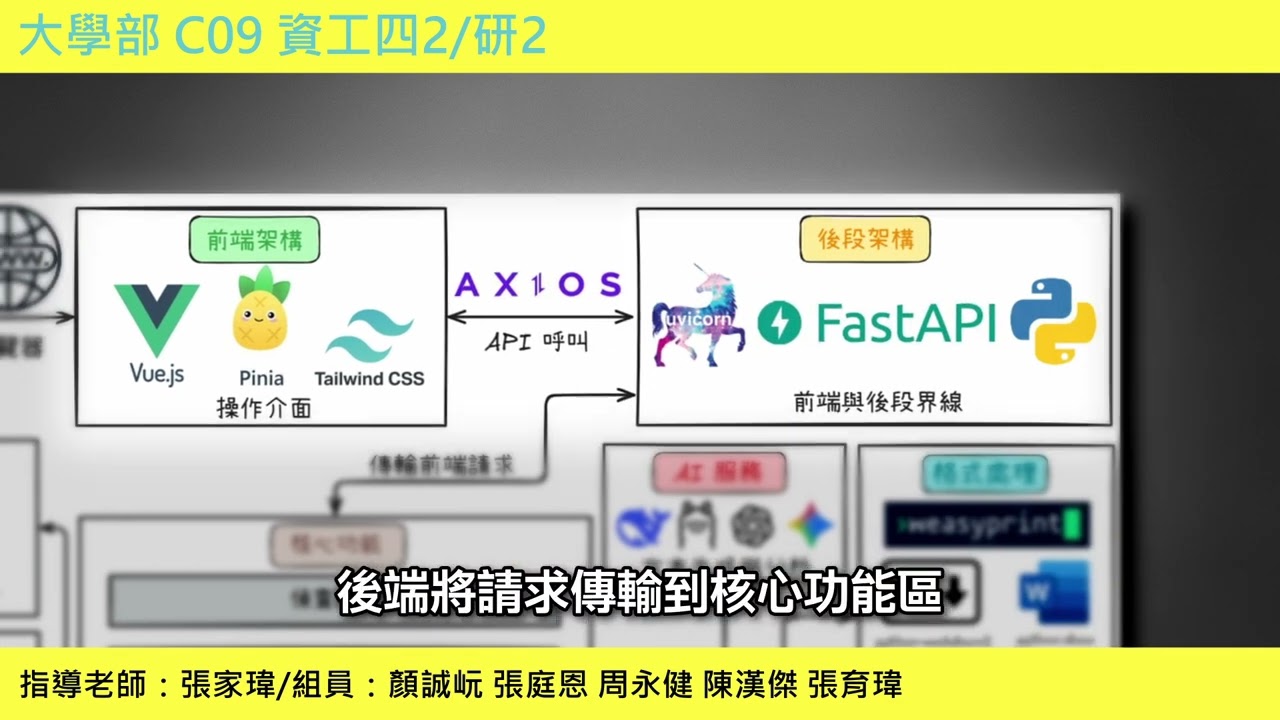](https://www.youtube.com/watch?v=piLfAfjIgPg)\n\n## Features\n\n### Core Capabilities\n\n- **Automated Vulnerability Scanning**: End-to-end penetration testing workflow with multiple specialized phases.\n- **AI-Powered Analysis**: Integration with Gemini, OpenAI, DeepSeek, or Ollama for intelligent vulnerability categorization.\n- **RAG-Enhanced Knowledge Base**: Semantic search and matching of vulnerabilities to curated security knowledge using ChromaDB.\n- **Comprehensive Reporting**: Automated generation of professional reports in PDF, DOCX, and HTML formats.\n- **Exploit Intelligence**: Automated searching across ExploitDB, GitHub, and Google for relevant exploits.\n- **Smart Web Enumeration**: Intelligent path analysis and attack surface mapping.\n\n### Testing Phases\n\n1. **Information Gathering**:\n - Network scanning with **Nmap** (SYN scan, service version detection).\n - Port detection and technology stack fingerprinting.\n\n2. **Web Enumeration**:\n - Directory and file discovery (supports **Dirsearch**, **Feroxbuster**, **Gospider**).\n - Intelligent path analysis and RAG-based categorization.\n - Auth endpoint detection.\n\n3. **Vulnerability Analysis**:\n - CVE lookup and matching.\n - AI-driven severity assessment and remediation suggestions.\n\n4. **SQL Injection Testing**:\n - Automated detection and exploitation using **SQLMap**.\n - Support for various injection techniques and database fingerprinting.\n\n5. **Authentication Testing**:\n - Credential brute-forcing using **Hydra** and **Medusa**.\n - Login form detection and bypass attempts.\n\n6. **Report Generation**:\n - Executive summaries and detailed technical findings.\n - Context-aware recommendations powered by AI.\n\n## Architecture\n\n### Backend\n\n- **Framework**: FastAPI (Python)\n- **Database**: SQLite (with SQLAlchemy)\n- **AI/ML**: LangChain, ChromaDB, Sentence Transformers\n- **Browser Automation**: Playwright\n- **Document Processing**: WeasyPrint, Python-docx, Pandoc\n\n### Frontend\n\n- **Framework**: Vue 3 + Vite\n- **State Management**: Pinia\n- **UI Framework**: Tailwind CSS, Headless UI\n- **Visualization**: Chart.js\n\n## Prerequisites\n\n### System Requirements\n\n- **Python**: 3.10+\n- **Node.js**: 16+\n- **OS**: Linux (Kali Linux recommended) or Windows (with tools installed)\n\n### Required Tools\n\nEnsure the following tools are installed and accessible in your system PATH:\n\n- `nmap`\n- `sqlmap`\n- `hydra`\n- `medusa`\n- `pandoc`\n- `dirsearch` (or equivalent web fuzzer)\n\n## Installation\n\n### 1. Clone the Repository\n\n```bash\ngit clone <repository-url>\ncd autosentou\n```\n\n### 2. Backend Setup\n\n```bash\ncd autosentou-backend\n\n# Create and activate virtual environment\npython -m venv venv\n# Linux/Mac\nsource venv/bin/activate\n# Windows\n# venv\\Scripts\\activate\n\n# Install dependencies\npip install -r requirements.txt\n\n# Install Playwright browsers\nplaywright install\n\n# Create .env file\ncp .env.example .env # You'll need to create this or edit .env manually\n```\n\n### 3. Frontend Setup\n\n```bash\ncd autosentou-frontend\n\n# Install dependencies\nnpm install\n```\n\n## Configuration\n\nCreate a `.env` file in `autosentou-backend/` with the following configuration. Adjust paths to match your system.\n\n```ini\n# Tool paths (Adjust if tools are not in system PATH)\nNMAP_PATH=nmap\nDIRSEARCH_PATH=dirsearch\nHYDRA_PATH=hydra\nMEDUSA_PATH=medusa\nSQLMAP_PATH=sqlmap\nPANDOC_PATH=pandoc\n\n# Wordlists\nDIRSEARCH_WORDLIST=/usr/share/wordlists/dirb/common.txt\nHYDRA_USERNAME_LIST=/usr/share/wordlists/rockyou.txt\nHYDRA_PASSWORD_LIST=/usr/share/wordlists/rockyou.txt\nMEDUSA_USERNAME_LIST=/usr/share/wordlists/rockyou.txt\nMEDUSA_PASSWORD_LIST=/usr/share/wordlists/rockyou.txt\n\n# AI Provider Configuration\n# Options: gemini, openai, deepseek, ollama\nAI_PROVIDER=gemini\n\n# API Keys (Fill required keys)\nGEMINI_API_KEY=your_gemini_api_key_here\nOPENAI_API_KEY=your_openai_api_key_here\nDEEPSEEK_API_KEY=your_deepseek_api_key_here\n\n# Ollama Configuration (for local models)\nOLLAMA_BASE_URL=http://localhost:11434\nOLLAMA_MODEL=llama3\n\n# Vector DB\nCHROMA_PERSIST_DIR=./chroma_db\nCHROMA_COLLECTION=pentest_vulns\n\n# App Settings\nSECRET_KEY=your_super_secret_key\nALGORITHM=HS256\n```\n\n## Usage\n\n### 1. Start the Backend\n\n```bash\ncd autosentou-backend\n# Ensure venv is active\nuvicorn main:app --reload --host 0.0.0.0 --port 8000\n```\n\nThe API will be available at `http://localhost:8000`. Documentation: `http://localhost:8000/docs`.\n\n### 2. Start the Frontend\n\n```bash\ncd autosentou-frontend\nnpm run dev\n```\n\nAccess the dashboard at `http://localhost:5173`.\n\n### 3. Run a Scan\n\n1. Open the web dashboard.\n2. Navigate to **\"New Scan\"**.\n3. Enter the **Target URL**.\n4. Select scan options (Phases, AI Provider).\n5. Click **\"Start Scan\"**.\n6. Monitor progress in the **Job Detail** view.\n\n## Disclaimer\n\n**IMPORTANT**: This tool is designed for **authorized security testing only**.\n\n- Only use on systems you own or have explicit written permission to test.\n- Misuse of this tool may violate local, state, or federal laws.\n- The authors are not responsible for any damage caused by the misuse of this software.\n\n"}}}} |