
1 line
63 KiB
JSON
1 line
63 KiB
JSON
{"repo": "abdulbasit742/social-claw", "files": {"README.md": {"47abfbb95e2802f3eaf90b690a43156dc4a976b2": {"t": 1785596156.5015633, "n": 15300, "h": "5d6427c730336b50", "c": "<div align=\"center\">\n<h1 align=\"center\">MoneyPrinterTurbo 💸</h1>\n\n<p align=\"center\">\n <a href=\"https://github.com/harry0703/MoneyPrinterTurbo/stargazers\"><img src=\"https://img.shields.io/github/stars/harry0703/MoneyPrinterTurbo.svg?style=for-the-badge\" alt=\"Stargazers\"></a>\n <a href=\"https://github.com/harry0703/MoneyPrinterTurbo/issues\"><img src=\"https://img.shields.io/github/issues/harry0703/MoneyPrinterTurbo.svg?style=for-the-badge\" alt=\"Issues\"></a>\n <a href=\"https://github.com/harry0703/MoneyPrinterTurbo/network/members\"><img src=\"https://img.shields.io/github/forks/harry0703/MoneyPrinterTurbo.svg?style=for-the-badge\" alt=\"Forks\"></a>\n <a href=\"https://github.com/harry0703/MoneyPrinterTurbo/blob/main/LICENSE\"><img src=\"https://img.shields.io/github/license/harry0703/MoneyPrinterTurbo.svg?style=for-the-badge\" alt=\"License\"></a>\n</p>\n<br>\n<h3>简体中文 | <a href=\"README-en.md\">English</a> | <a href=\"README-ar.md\">العربية</a></h3>\n<div align=\"center\">\n <a href=\"https://trendshift.io/repositories/8731\" target=\"_blank\"><img src=\"https://trendshift.io/api/badge/repositories/8731\" alt=\"harry0703%2FMoneyPrinterTurbo | Trendshift\" style=\"width: 250px; height: 55px;\" width=\"250\" height=\"55\"/></a>\n</div>\n\n<br>\n只需提供一个视频 <b>主题</b> 或 <b>关键词</b> ,就可以全自动生成视频文案、视频素材、视频字幕、视频背景音乐,然后合成一个高清的短视频。\n<br>\n\n<h4>Web界面</h4>\n\n\n\n<h4>API界面</h4>\n\n\n\n</div>\n\n## 特别感谢 🙏\n\n<table align=\"center\">\n <tr>\n <td align=\"center\" width=\"160\">\n <a href=\"https://aihubmix.com/?aff=CEve\"><strong>AIHubMix</strong></a>\n </td>\n <td align=\"left\">\n <sub>感谢 <a href=\"https://aihubmix.com/?aff=CEve\">AIHubMix</a> 对本项目的赞助。AIHubMix 深度适配 OpenAI、Claude、Gemini、DeepSeek、智谱、千问等全球顶级最新模型,一站式快速接入 GPT-5.5、deepseek-v4-flash 等 700+ 模型(含多个免费模型),提供企业级生产稳定性保障。</sub>\n </td>\n </tr>\n\n <tr>\n <td align=\"center\" width=\"160\">\n <a href=\"https://www.volcengine.com/activity/ai618?utm_campaign=hw&utm_content=hw&utm_medium=devrel_tool_web&utm_source=OWO&utm_term=MoneyPrinterTurbo\"><img src=\"docs/sponsors/volcengine-logo.svg\" alt=\"火山引擎\" height=\"32\"></a><br>\n <a href=\"https://www.volcengine.com/activity/ai618?utm_campaign=hw&utm_content=hw&utm_medium=devrel_tool_web&utm_source=OWO&utm_term=MoneyPrinterTurbo\"><strong>火山引擎</strong></a>\n </td>\n <td align=\"left\">\n <sub>感谢 <a href=\"https://www.volcengine.com/activity/ai618?utm_campaign=hw&utm_content=hw&utm_medium=devrel_tool_web&utm_source=OWO&utm_term=MoneyPrinterTurbo\">火山引擎</a> 赞助了本项目!方舟 Agent Plan 模型订阅套餐集成了包含 Doubao-Seed、Doubao-Seedance、Doubao-Seedream 等在内的字节跳动自研 SOTA 级模型,覆盖文本、代码、图像、视频等多模态任务。最新支持 MiniMax-M3、DeepSeek-V4 系列、GLM-5.2、Doubao-Seed-2.0 系列、Kimi-K2.7 等模型,工具不限。超全模态模型与 Harness 升级一步到位,深度支持 Agent 框架与 AI 编程工具。一次订阅,可以为不同任务切换合适的 AI 引擎。方舟 Agent Plan 限时 2.5 折订阅,<a href=\"https://www.volcengine.com/activity/ai618?utm_campaign=hw&utm_content=hw&utm_medium=devrel_tool_web&utm_source=OWO&utm_term=MoneyPrinterTurbo\">点击链接抢购</a>,名额有限,先到先得。</sub>\n </td>\n </tr>\n <tr>\n <td align=\"center\" width=\"160\">\n <a href=\"https://www.ccsub.net/register?ref=VCVDAWWY\"><img src=\"docs/sponsors/ccsub-logo.png\" alt=\"CCSub\" height=\"36\"></a><br>\n <a href=\"https://www.ccsub.net/register?ref=VCVDAWWY\"><strong>CCSub</strong></a>\n </td>\n <td align=\"left\">\n <sub>感谢 <a href=\"https://www.ccsub.net/register?ref=VCVDAWWY\">CCSub</a> 赞助本项目!CCSub 是稳定、实惠的 AI API 中转平台,是 Claude Code 官方订阅的超强平替。一个 API Key 即可调用 Claude Opus 4.8、Sonnet 4.6、Haiku 4.5、GPT-5、Gemini 等模型,价格约为官方直连的 1/3,全球直连无需梯子。兼容 Claude Code、Codex、Cursor、Cline、Continue、Windsurf 等所有主流 AI 编程工具。前往 <a href=\"https://www.ccsub.net/register?ref=VCVDAWWY\">www.ccsub.net</a> 注册即送 $5 体验额度。</sub>\n </td>\n </tr>\n <tr>\n <td align=\"center\" width=\"160\">\n <a href=\"https://www.compshare.cn/coding-plan?ytag=GPU_YY-git_MoneyPrinterTu\"><img src=\"docs/sponsors/compshare-logo.png\" alt=\"优云智算\" height=\"34\"></a><br>\n <a href=\"https://www.compshare.cn/coding-plan?ytag=GPU_YY-git_MoneyPrinterTu\"><strong>优云智算</strong></a>\n </td>\n <td align=\"left\">\n <sub>感谢 <a href=\"https://www.compshare.cn/coding-plan?ytag=GPU_YY-git_MoneyPrinterTu\">优云智算</a> 赞助本项目!优云智算是 UCloud 旗下 AI 云平台,一站式提供国内外主流模型的 API 服务,一个 Key 即可调用所有模型。主打高性价比国产模型 CodingPlan 套餐(GLM5.2、Deepseek-v4等),同时提供官方转发的稳定海外模型通道,满足多场景开发需求。已兼容 Claude Code、Codex 等主流 AI 编程工具及通用 API 调用,支持企业级高并发、7×24 技术支持和自助开票。<a href=\"https://www.compshare.cn/coding-plan?ytag=GPU_YY-git_MoneyPrinterTu\">点击注册</a>,最高可获得 ¥10 免费体验金。</sub>\n </td>\n </tr>\n <tr>\n <td align=\"center\" width=\"160\">\n <a href=\"https://reccloud.cn\"><img src=\"docs/sponsors/reccloud-logo.svg\" alt=\"录咖\" height=\"36\"></a><br>\n <a href=\"https://reccloud.cn\"><strong>录咖 AI</strong></a>\n </td>\n <td align=\"left\">\n <sub>由于该项目的 <strong>部署</strong> 和 <strong>使用</strong>,对于一些小白用户来说,还是 <strong>有一定的门槛</strong>,在此特别感谢 <a href=\"https://reccloud.cn\">录咖(AI智能 多媒体服务平台)</a> 网站基于该项目,提供的免费 <code>AI视频生成器</code> 服务,可以不用部署,直接在线使用,非常方便。</sub>\n </td>\n </tr>\n <tr>\n <td align=\"center\" width=\"160\">\n <a href=\"https://picwish.cn\"><img src=\"docs/sponsors/picwish-logo.svg\" alt=\"佐糖\" height=\"36\"></a><br>\n <a href=\"https://picwish.cn\"><strong>佐糖</strong></a>\n </td>\n <td align=\"left\">\n <sub>感谢 <a href=\"https://picwish.cn\">佐糖</a> 对该项目的支持和赞助,使得该项目能够持续的更新和维护。佐糖专注于<strong>图像处理领域</strong>,提供丰富的<strong>图像处理工具</strong>,将复杂操作极致简化,真正实现让图像处理更简单。</sub>\n </td>\n </tr>\n</table>\n\n## 功能特性 🎯\n\n- [x] 完整的 **MVC架构**,代码 **结构清晰**,易于维护,支持 `API` 和 `Web界面`\n- [x] 支持视频文案 **AI自动生成**,也可以**自定义文案**\n- [x] 支持多种 **高清视频** 尺寸\n - [x] 竖屏 9:16,`1080x1920`\n - [x] 横屏 16:9,`1920x1080`\n- [x] 支持 **批量视频生成**,可以一次生成多个视频,然后选择一个最满意的\n- [x] 支持 **视频片段时长** 设置,方便调节素材切换频率\n- [x] 支持 **中文** 和 **英文** 视频文案\n- [x] 支持 **多种语音** 合成,可 **实时试听** 效果\n- [x] 支持 **字幕生成**,可以调整 `字体`、`位置`、`颜色`、`大小`,同时支持`字幕描边`设置\n- [x] 支持 **背景音乐**,随机或者指定音乐文件,可设置`背景音乐音量`\n- [x] 视频素材来源 **高清**,而且 **无版权**,也可以使用自己的 **本地素材**\n- [x] 支持多种素材源:**Pexels**、**Pixabay**、**Coverr**\n- [x] 可选接入 **TwelveLabs** 视频 AI:用 **Marengo** 多模态向量按主题语义重排素材关键词,用 **Pegasus** 对素材做内容 QA/描述([TwelveLabs API key](https://twelvelabs.io))\n- [x] 支持 **OpenAI**、**AIHubMix**、**AIML API**、**EvoLink**、**Moonshot**、**Azure**、**gpt4free**、**one-api**、**通义千问**、**Google Gemini**、**Ollama**、**DeepSeek**、**MiniMax**、 **文心一言**, **Pollinations**、**ModelScope** 等多种模型接入\n- [x] 支持一键 **跨平台发布**,生成完成后自动上传至 **TikTok**、**Instagram** 和 **YouTube Shorts**(需 [Upload-Post](https://upload-post.com) 账号;YouTube 发布时自动标注 AI 生成内容);在 `config.toml` 中配置 `upload_post_platforms`、`upload_post_youtube_privacy_status` 等参数\n\n## 视频演示 📺\n\n### 竖屏 9:16\n\n<table>\n<thead>\n<tr>\n<th align=\"center\"><g-emoji class=\"g-emoji\" alias=\"arrow_forward\">▶️</g-emoji> 《如何增加生活的乐趣》</th>\n<th align=\"center\"><g-emoji class=\"g-emoji\" alias=\"arrow_forward\">▶️</g-emoji> 《金钱的作用》<br>更真实的合成声音</th>\n<th align=\"center\"><g-emoji class=\"g-emoji\" alias=\"arrow_forward\">▶️</g-emoji> 《生命的意义是什么》</th>\n</tr>\n</thead>\n<tbody>\n<tr>\n<td align=\"center\"><video src=\"https://github.com/harry0703/MoneyPrinterTurbo/assets/4928832/a84d33d5-27a2-4aba-8fd0-9fb2bd91c6a6\"></video></td>\n<td align=\"center\"><video src=\"https://github.com/harry0703/MoneyPrinterTurbo/assets/4928832/af2f3b0b-002e-49fe-b161-18ba91c055e8\"></video></td>\n<td align=\"center\"><video src=\"https://github.com/harry0703/MoneyPrinterTurbo/assets/4928832/112c9564-d52b-4472-99ad-970b75f66476\"></video></td>\n</tr>\n</tbody>\n</table>\n\n### 横屏 16:9\n\n<table>\n<thead>\n<tr>\n<th align=\"center\"><g-emoji class=\"g-emoji\" alias=\"arrow_forward\">▶️</g-emoji>《生命的意义是什么》</th>\n<th align=\"center\"><g-emoji class=\"g-emoji\" alias=\"arrow_forward\">▶️</g-emoji>《为什么要运动》</th>\n</tr>\n</thead>\n<tbody>\n<tr>\n<td align=\"center\"><video src=\"https://github.com/harry0703/MoneyPrinterTurbo/assets/4928832/346ebb15-c55f-47a9-a653-114f08bb8073\"></video></td>\n<td align=\"center\"><video src=\"https://github.com/harry0703/MoneyPrinterTurbo/assets/4928832/271f2fae-8283-44a0-8aa0-0ed8f9a6fa87\"></video></td>\n</tr>\n</tbody>\n</table>\n\n## 配置要求 📦\n\n- 建议系统:Windows 10 或 MacOS 11.0 以上,或主流 Linux 发行版\n- GPU 不是必需项,但如果你希望本地转录、更快的视频处理或更顺畅的批量生成体验,建议使用带显存的独立显卡\n\n| 项目 | 最低配置 | 推荐配置 | 理想配置 |\n| ---- | -------- | --------------- | --------------- |\n| CPU | 4 核 | 6 到 8 核 | 8 核及以上 |\n| RAM | 4 GB | 8 GB | 16 GB 及以上 |\n| GPU | 非必须 | 4 GB 显存及以上 | 8 GB 显存及以上 |\n\n- 如果你主要依赖云端 LLM、云端 TTS 和在线素材源,CPU 与内存比 GPU 更重要\n- 如果你启用 `faster-whisper`、批量生成或更重的本地处理链路,GPU 会明显提升速度\n\n## 快速开始 🚀\n\n### 推荐使用方式\n\n- Windows 用户:优先使用一键启动包,适合快速体验\n- MacOS / Linux 用户:优先使用 `uv sync --frozen` 进行本地部署\n- 想要隔离运行环境:优先使用 Docker 部署\n\n### 在 Google Colab 中运行\n\n免去本地环境配置,点击直接在 Google Colab 中快速体验 MoneyPrinterTurbo\n\n[](https://colab.research.google.com/github/harry0703/MoneyPrinterTurbo/blob/main/docs/MoneyPrinterTurbo.ipynb)\n\n### Windows一键启动包\n\n下载一键启动包,解压直接使用(路径不要有 **中文**、**特殊字符**、**空格**)\n\n- GitHub Release: https://github.com/harry0703/MoneyPrinterTurbo/releases/latest\n\n下载后,建议先**双击执行** `update.bat` 更新到**最新代码**,然后双击 `start.bat` 启动\n\n启动后,会自动打开浏览器(如果打开是空白,建议换成 **Chrome** 或者 **Edge** 打开)\n\n## 安装部署 📥\n\n### 前提条件\n\n- 尽量不要使用 **中文路径**,避免出现一些无法预料的问题\n- 请确保你的 **网络** 是正常的,VPN需要打开`全局流量`模式\n\n#### ① 克隆代码\n\n```shell\ngit clone https://github.com/harry0703/MoneyPrinterTurbo.git\n```\n\n#### ② 修改配置文件(可选,建议启动后也可以在 WebUI 里面配置)\n\n- 将 `config.example.toml` 文件复制一份,命名为 `config.toml`\n- 按照 `config.toml` 文件中的说明,配置好 `pexels_api_keys` 和 `llm_provider`,并根据 llm_provider 对应的服务商,配置相关的\n API Key\n- 如果希望使用推荐的大模型平台,也可以将 `llm_provider` 设置为 `aihubmix`,并填写对应的 API Key。\n\n### Docker部署 🐳\n\n#### ① 启动Docker\n\n如果未安装 Docker,请先安装 https://www.docker.com/products/docker-desktop/\n\n如果是Windows系统,请参考微软的文档:\n\n1. https://learn.microsoft.com/zh-cn/windows/wsl/install\n2. https://learn.microsoft.com/zh-cn/windows/wsl/tutorials/wsl-containers\n\n```shell\ncd MoneyPrinterTurbo\ndocker compose -f docker-compose.release.yml up\n```\n\n> 默认推荐使用 `docker-compose.release.yml`,它会直接拉取 GitHub Container Registry 上的预构建镜像:`ghcr.io/harry0703/moneyprinterturbo:latest`。\n> 如果你需要本地重新构建镜像,可以继续使用 `docker compose up`。\n> 注意:首次启动前请确保项目根目录下存在 `config.toml`,可以从 `config.example.toml` 复制一份。\n\n#### ② 访问Web界面\n\n打开浏览器,访问 http://127.0.0.1:8501\n\n#### ③ 访问API文档\n\n打开浏览器,访问 http://127.0.0.1:8080/docs 或者 http://127.0.0.1:8080/redoc\n\n### 手动部署 📦\n\n> 视频教程\n\n- 完整的使用演示:https://v.douyin.com/iFhnwsKY/\n- 如何在Windows上部署:https://v.douyin.com/iFyjoW3M\n\n#### ① 创建虚拟环境\n\n推荐使用 [uv](https://docs.astral.sh/uv/) 管理 Python 环境和依赖,默认使用 Python `3.11`\n\n```shell\ngit clone https://github.com/harry0703/MoneyPrinterTurbo.git\ncd MoneyPrinterTurbo\nuv python install 3.11\nuv sync --frozen\n```\n\n如果你暂时不使用 `uv`,也可以继续使用 `venv + pip`\n\n```shell\npython3.11 -m venv .venv\nsource .venv/bin/activate\npip install -r requirements.txt\n```\n\n说明:\n\n- `pyproject.toml` 是主依赖定义文件\n- `uv.lock` 是锁文件,建议默认执行 `uv sync --frozen`\n- `requirements.txt` 仅保留给旧的 `pip` 安装方式兼容使用\n\n#### ② 启动Web界面 🌐\n\n注意需要到 MoneyPrinterTurbo 项目 `根目录` 下执行以下命令\n\n###### Windows\n\n```powershell\n.\\webui.bat\n```\n\n在 CMD 中也可以执行 `webui.bat`。\n`webui.bat` 会优先使用项目 `.venv` 或一键包内置 Python;如果没有找到项目 Python,但已安装 `uv`,会自动切换为 `uv run streamlit`。\n如需允许局域网内其他设备访问 WebUI,可以先执行 `set MPT_WEBUI_HOST=0.0.0.0`,再运行 `webui.bat`。\n\n###### MacOS or Linux\n\n```shell\nuv run streamlit run ./webui/Main.py --browser.gatherUsageStats=False --server.showEmailPrompt=False\n```\n\n如果你已经手动激活了虚拟环境,也可以直接执行:\n\n```shell\nsh webui.sh\n```\n\n启动后,会自动打开浏览器(如果打开是空白,建议换成 **Chrome** 或者 **Edge** 打开)\n\n#### ③ 启动API服务 🚀\n\n```shell\nuv run python main.py\n```\n\n如果你已经手动激活了虚拟环境,也可以直接执行:\n\n```shell\npython main.py\n```\n\n#### ④ 纯命令行方式(无浏览器)⌨️\n\n如果你无法使用浏览器或端口转发,可以直接在命令行生成视频:\n\n```shell\nuv run python cli.py --video-subject \"金钱的作用\"\n```\n\n也可以指定本地素材并仅运行到某个阶段:\n\n```shell\nuv run python cli.py \\\n --video-subject \"金钱的作用\" \\\n --video-source local \\\n --video-materials \"1.mp4,2.mp4\" \\\n --stop-at video\n```\n\n## 语音合成 🗣\n\n所有支持的声音列表,可以查看:[声音列表](./docs/voice-list.txt)\n\n默认 TTS 服务是 **Edge TTS**(免费,不需要 API Key)。在 WebUI 中它显示为 **“Azure TTS V1”**,两者指的是同一个免费服务。你可以在 `config.toml` 中设置 `voice_name`,也可以直接在 WebUI 的声音下拉框中选择。\n\n> **说明:** WebUI 中的 “Azure TTS V1”(Edge TTS,免费)和 “Azure TTS V2”(付费 Azure Speech SDK)是两个不同选项,只有 V2 需要配置 Azure API Key。\n\n如果你希望使用质量更高的 **Azure TTS V2** 声音,需要在 `config.toml` 中配置 Azure Speech 凭据:\n\n```toml\n[azure]\nspeech_key = \"your-azure-speech-key\"\nspeech_region = \"eastus\"\n```\n\nAzure TTS V2 需要开通 [Azure Speech Services](https://portal.azure.com/) 订阅。v1.1.2 新增的 9 种 Azure 声音整体会比 Edge TTS 更自然。\n\n## 字幕生成 📜\n\n当前支持2种字幕生成方式:\n\n- **edge**: 使用 Edge TTS 返回的时间戳对齐字幕。速度快,不需要 GPU,普通机器也可以运行;但复杂句子的时间戳偶尔可能不够准确。\n- **whisper**: 使用本地 `faster-whisper` 转写生成后的音频,并生成更细粒度的时间戳。速度较慢(CPU 上通常需要几秒到约 1 分钟,取决于模型大小),需要下载模型(`large-v3-turbo` 约 250 MB,`large-v3` 约 3 GB),但不依赖 TTS provider 的时间戳,字幕准确性通常更好。\n\n可以修改 `config.toml` 配置文件中的 `subtitle_provider` 进行切换\n\n建议使用 `edge` 模式,如果生成的字幕质量不好,再切换到 `whisper` 模式\n\n> 注意:\n\n1. whisper 模式下需要到 HuggingFace 下载一个模型文件,大约 3GB 左右,请确保网络通畅\n2. 如果留空,表示不生成字幕。\n\n> 由于国内无法访问 HuggingFace,可以使用以下方法下载 `whisper-large-v3` 的模型文件\n\n下载地址:\n\n- 百度网盘: https://pan.baidu.com/s/11h3Q6tsDtjQKTjUu3sc5cA?pwd=xjs9\n- 夸克网盘:https://pan.quark.cn/s/3ee3d991d64b\n\n模型下载后解压,整个目录放到 `.\\MoneyPrinterTurbo\\models` 里面,\n最终的文件路径应该是这样: `.\\MoneyPrinterTurbo\\models\\whisper-large-v3`\n\n```\nMoneyPrinterTurbo\n ├─models\n │ └─whisper-large-v3\n │ config.json\n │ model.bin\n │ preprocessor_config.json\n │ tokenizer.json\n │ vocabulary.json\n```\n\n## 背景音乐 🎵\n\n用于视频的背景音乐,位于项目的 `resource/songs` 目录下。\n\n> 当前项目里面放了一些默认的音乐,来自于 YouTube 视频,如有侵权,请删除。\n\n## 字幕字体 🅰\n\n用于视频字幕的渲染,位于项目的 `resource/fonts` 目录下,你也可以放进去自己的字体。\n\n## 常见问题 🤔\n\n### ❓RuntimeError: No ffmpeg exe could be found\n\n通常情况下,ffmpeg 会被自动下载,并且会被自动检测到。\n但是如果你的环境有问题,无法自动下载,可能会遇到如下错误:\n\n```\nRuntimeError: No ffmpeg exe could be found.\nInstall ffmpeg on your system, or set the IMAGEIO_FFMPEG_EXE environment variable.\n```\n\n此时你可以从 https://www.gyan.dev/ffmpeg/builds/ 下载ffmpeg,解压后,设置 `ffmpeg_path` 为你的实际安装路径即可。\n\n```toml\n[app]\n# 请根据你的实际路径设置,注意 Windows 路径分隔符为 \\\\\nffmpeg_path = \"C:\\\\Users\\\\harry\\\\Downloads\\\\ffmpeg.exe\"\n```\n\n### ❓ImageMagick 相关错误\n\n> **当前版本已经不需要 ImageMagick。**\n>\n> 项目升级到 **MoviePy 2.x** 后,字幕渲染已经改为使用 **Pillow**,不再依赖 ImageMagick。如果你仍然看到 ImageMagick 相关错误,通常说明运行的是旧版本代码。请先执行 `git pull` 更新代码,Windows 用户也可以运行 `update.bat` 更新。\n\n### ❓OSError: [Errno 24] Too many open files\n\n这个问题是由于系统打开文件数限制导致的,可以通过修改系统的文件打开数限制来解决。\n\n查看当前限制\n\n```shell\nulimit -n\n```\n\n如果过低,可以调高一些,比如\n\n```shell\nulimit -n 10240\n```\n\n### ❓Whisper 模型下载失败,出现如下错误\n\n```\nLocalEntryNotFoundError: Cannot find an appropriate cached snapshot folder for the specified revision on the local disk and\noutgoing traffic has been disabled.\nTo enable repo look-ups and downloads online, pass 'local_files_only=False' as input.\n```\n\n或者\n\n```\nAn error occurred while synchronizing the model Systran/faster-whisper-large-v3 from the Hugging Face Hub:\nAn error happened while trying to locate the files on the Hub and we cannot find the appropriate snapshot folder for the\nspecified revision on the local disk. Please check your internet connection and try again.\nTrying to load the model directly from the local cache, if it exists.\n```\n\n解决方法:[点击查看如何从网盘手动下载模型](#%E5%AD%97%E5%B9%95%E7%94%9F%E6%88%90-)\n\n## 反馈建议 📢\n\n- 可以提交 [issue](https://github.com/harry0703/MoneyPrinterTurbo/issues)\n 或者 [pull request](https://github.com/harry0703/MoneyPrinterTurbo/pulls)。\n\n## 许可证 📝\n\n点击查看 [`LICENSE`](LICENSE) 文件\n\n## Star History\n\n[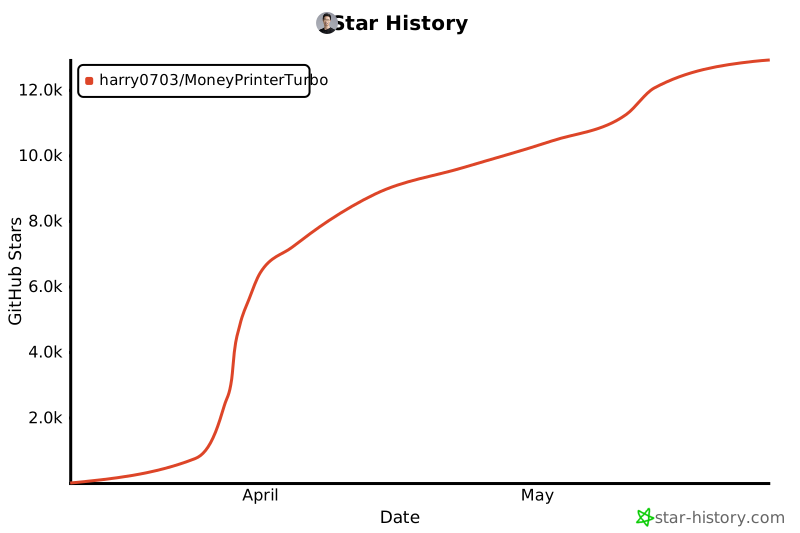](https://star-history.com/#harry0703/MoneyPrinterTurbo&Date)\n"}}, "config.example.toml": {"47abfbb95e2802f3eaf90b690a43156dc4a976b2": {"t": 1785745360.1564178, "n": 18597, "h": "9e5105a6f7996386", "c": "[app]\nvideo_source = \"pexels\" # \"pexels\" or \"pixabay\"\n\n# 是否隐藏配置面板\nhide_config = false\n\n# Azure TTS V1(edge_tts) 单次流式请求超时时间,单位秒。\n# 网络异常、服务端限流或 voice 与文本语言不匹配时,edge_tts 可能长期卡住。\n# 默认 30 秒可避免 WebUI 任务无反馈;慢网络或代理环境可适当调大。\n# 设置为 0 表示禁用超时。\nedge_tts_timeout = 30\n\n# 是否校验外部 API 和素材下载的 TLS 证书。\n# 默认必须开启,避免 Pexels/Pixabay API key 和下载素材被中间人攻击篡改。\n# 只有在企业代理或自签证书环境明确需要时,才临时改为 false。\ntls_verify = true\n\n# Pexels API Key\n# Register at https://www.pexels.com/api/ to get your API key.\n# You can use multiple keys to avoid rate limits.\n# For example: pexels_api_keys = [\"123adsf4567adf89\",\"abd1321cd13efgfdfhi\"]\n# Use straight ASCII double quotes around each key. Smart quotes copied from rich text will break TOML parsing.\n# 请使用英文半角双引号包裹每个 Key;从富文本复制来的弯引号会导致 TOML 解析失败。\n# 特别注意格式,Key 用英文双引号括起来,多个Key用逗号隔开\npexels_api_keys = []\n\n# Pixabay API Key\n# Register at https://pixabay.com/api/docs/ to get your API key.\n# You can use multiple keys to avoid rate limits.\n# For example: pixabay_api_keys = [\"123adsf4567adf89\",\"abd1321cd13efgfdfhi\"]\n# Use straight ASCII double quotes around each key. Smart quotes copied from rich text will break TOML parsing.\n# 请使用英文半角双引号包裹每个 Key;从富文本复制来的弯引号会导致 TOML 解析失败。\n# 特别注意格式,Key 用英文双引号括起来,多个Key用逗号隔开\npixabay_api_keys = []\n\n# Coverr API Key\n# Register at https://coverr.co/developers?ctx=header_navigation to get your API key instantly.\n# Free tier (Demo) is limited to 50 requests/hour — sufficient for a few\n# video tasks per hour. Upgrade to Pro/Ultimate subscription for 2000/hour.\n# Coverr provides free HD/4K stock videos (subject to Coverr license terms,\n# see https://coverr.co/license), mostly 16:9 landscape; if\n# you generate 9:16 short-form videos, prefer Pexels/Pixabay as primary\n# and use Coverr to widen the catalog for landscape/cinematic content.\n# You can use multiple keys to avoid rate limits.\n# For example: coverr_api_keys = [\"123adsf4567adf89\",\"abd1321cd13efgfdfhi\"]\n# Use straight ASCII double quotes around each key. Smart quotes copied from rich text will break TOML parsing.\n# 请使用英文半角双引号包裹每个 Key;从富文本复制来的弯引号会导致 TOML 解析失败。\n# 特别注意格式,Key 用英文双引号括起来,多个Key用逗号隔开\ncoverr_api_keys = []\n\n# TwelveLabs API Key (optional) — https://twelvelabs.io\n# TwelveLabs (可选) 视频理解 / 多模态嵌入集成。\n# Enables two opt-in features:\n# * Marengo (multimodal embeddings) semantically reorders the auto-generated\n# search terms by relevance to your video subject, so the most on-topic\n# B-roll is downloaded first when the timeline budget is tight.\n# * Pegasus (video understanding) can QA / describe a clip from its URL.\n# Leave empty to keep MoneyPrinterTurbo's behavior completely unchanged.\n# Configure a TwelveLabs API key from the TwelveLabs dashboard (https://twelvelabs.io) and install the\n# optional dependency with `uv sync --extra twelvelabs`.\n# Register at https://playground.twelvelabs.io to get your API key.\n# You can use multiple keys to avoid rate limits.\n# For example: twelvelabs_api_keys = [\"tlk_123adsf4567\",\"tlk_abd1321cd13ef\"]\n# 请使用英文半角双引号包裹每个 Key;从富文本复制来的弯引号会导致 TOML 解析失败。\ntwelvelabs_api_keys = []\n\n# Reorder search terms by Marengo relevance before downloading footage.\n# Requires twelvelabs_api_keys above. Ignored in \"match materials to script\"\n# mode, where term order is intentionally the script's narrative order.\ntwelvelabs_rerank_terms = false\n\n# Optional model overrides (defaults shown).\n# twelvelabs_marengo_model = \"marengo3.0\"\n# twelvelabs_pegasus_model = \"pegasus1.5\"\n\n# 支持的提供商 (Supported providers):\n# openai\n# aihubmix (OpenAI-compatible AI model gateway)\n# aimlapi (OpenAI-compatible multi-model AI API)\n# moonshot (月之暗面)\n# azure\n# qwen (通义千问)\n# deepseek\n# gemini\n# ollama\n# g4f (disabled by default; set enable_g4f=true only after accepting its risks)\n# oneapi\n# cloudflare\n# minimax\n# evolink (OpenAI-compatible multi-model AI gateway)\n# volcengine (VolcEngine Ark OpenAI-compatible API)\n# mimo (Xiaomi MiMo)\n# ernie (文心一言)\n# modelscope (魔搭社区)\n# litellm (100+ providers via LiteLLM gateway)\nllm_provider = \"openai\"\n\n########## Pollinations AI Settings\n# Visit https://pollinations.ai/ to learn more\n# API Key is optional - leave empty for public access\npollinations_api_key = \"\"\n# Base URL for Pollinations API.\n# Leave empty to use the default endpoint (https://text.pollinations.ai/openai).\n# Note: the old \"https://pollinations.ai/api/v1\" endpoint no longer accepts\n# requests (returns 405 Method Not Allowed), so only set this if you have a\n# working custom endpoint.\npollinations_base_url = \"\"\n# Default model for text generation\npollinations_model_name = \"openai-fast\"\n\n########## Ollama Settings\n# No need to set it unless you want to use your own proxy\nollama_base_url = \"\"\n# Check your available models at https://ollama.com/library\nollama_model_name = \"\"\n\n########## OpenAI API Key\n# Get your API key at https://platform.openai.com/api-keys\n# 也可以填写兼容 OpenAI Chat Completions 协议的供应商密钥,\n# 例如 OpenRouter 这类提供自定义 base_url 的平台。\nopenai_api_key = \"\"\n# No need to set it unless you want to use your own proxy\n# 如果使用兼容 OpenAI 接口的平台,请在这里填写对应的 base_url。\nopenai_base_url = \"\"\n# Check your available models at https://platform.openai.com/account/limits\n# 如果使用兼容供应商,请填写该平台要求的模型 ID。\nopenai_model_name = \"gpt-4o-mini\"\n\n########## AIHubMix API Key\n# AIHubMix is OpenAI-compatible and can use one API key to access multiple models.\n# Visit https://aihubmix.com/?aff=CEve to register and get your API key.\naihubmix_api_key = \"\"\naihubmix_base_url = \"https://aihubmix.com/v1\"\naihubmix_model_name = \"gpt-5.4-mini\"\n\n########## AIML API Key\n# AIML API is OpenAI-compatible and can use one API key to access multiple model families.\n# Visit https://aimlapi.com/app/keys to create your API key.\naimlapi_api_key = \"\"\naimlapi_base_url = \"https://api.aimlapi.com/v1\"\naimlapi_model_name = \"openai/gpt-4o-mini\"\n\n########## Moonshot API Key\n# Visit https://platform.moonshot.cn/console/api-keys to get your API key.\nmoonshot_api_key = \"\"\nmoonshot_base_url = \"https://api.moonshot.cn/v1\"\nmoonshot_model_name = \"moonshot-v1-8k\"\n\n########## OneAPI API Key\n# Visit https://github.com/songquanpeng/one-api to get your API key\noneapi_api_key = \"\"\noneapi_base_url = \"\"\noneapi_model_name = \"\"\n\n########## G4F\n# g4f relies on reverse-engineered third-party endpoints and is not recommended\n# for production. Prefer official APIs, OpenAI-compatible providers, LiteLLM,\n# Ollama, or local inference.\n# If you still need it, install the optional dependency with:\n# uv sync --extra g4f\nenable_g4f = false\n# Visit https://github.com/xtekky/gpt4free to get more details\n# Supported model list: https://github.com/xtekky/gpt4free/blob/main/g4f/models.py\ng4f_model_name = \"gpt-3.5-turbo\"\n\n########## Azure API Key\n# Visit https://learn.microsoft.com/zh-cn/azure/ai-services/openai/ to get more details\n# API documentation: https://learn.microsoft.com/zh-cn/azure/ai-services/openai/reference\nazure_api_key = \"\"\nazure_base_url = \"\"\nazure_model_name = \"gpt-35-turbo\" # replace with your model deployment name\nazure_api_version = \"2024-02-15-preview\"\n\n########## Gemini API Key\ngemini_api_key = \"\"\ngemini_model_name = \"gemini-2.5-flash\"\n\n########## Grok API Key\ngrok_api_key = \"\"\ngrok_model_name = \"grok-4.3\"\ngrok_base_url = \"https://api.x.ai/v1\"\n\n########## Groq API Key\n# Visit https://console.groq.com/keys to get your api keys\n# API documentation: https://console.groq.com/docs/api-reference\n# Available models: https://console.groq.com/docs/api-reference#models-list\ngroq_api_key = \"\"\ngroq_model_name = \"llama-3.3-70b-versatile\"\ngroq_base_url = \"https://api.groq.com/openai/v1\"\n\n########## Qwen API Key\n# Visit https://dashscope.console.aliyun.com/apiKey to get your API key\n# Visit below links to get more details\n# https://tongyi.aliyun.com/qianwen/\n# https://help.aliyun.com/zh/dashscope/developer-reference/model-introduction\nqwen_api_key = \"\"\nqwen_model_name = \"qwen-max\"\n\n\n########## MiniMax API Key\n# Visit https://platform.minimax.io or https://platform.minimaxi.com to get your API key\n# MiniMax API is OpenAI-compatible\n# Available models: MiniMax-M3 (default), MiniMax-M2.7, MiniMax-M2.7-highspeed\n# If your API key returns 401 on api.minimax.io, try the China endpoint: https://api.minimaxi.com/v1\nminimax_api_key = \"\"\nminimax_base_url = \"https://api.minimax.io/v1\"\nminimax_model_name = \"MiniMax-M3\"\n\n########## EvoLink API Key\n# EvoLink is an OpenAI-compatible gateway for language models.\n# Visit https://evolink.ai/dashboard/keys to get your API key.\n# API documentation: https://docs.evolink.ai/en/api-manual/language-series\n# Available models include gpt-5.5, gpt-5.4, gpt-5.2, deepseek-v4-flash, deepseek-v4-pro, gemini-3.1-pro, and doubao-seed-2.0-pro.\nevolink_api_key = \"\"\nevolink_base_url = \"https://direct.evolink.ai/v1\"\nevolink_model_name = \"gpt-5.5\"\n\n########## VolcEngine Ark API Key\n# VolcEngine Ark provides an OpenAI-compatible Chat Completions API.\n# Create an API key in the VolcEngine Ark console and use a model ID that is\n# enabled for your account.\nvolcengine_api_key = \"\"\nvolcengine_base_url = \"https://ark.cn-beijing.volces.com/api/v3\"\nvolcengine_model_name = \"doubao-seed-2-1-turbo-260628\"\n\n########## Xiaomi MiMo API Key\n# Xiaomi MiMo API is OpenAI-compatible.\n# Visit https://platform.xiaomimimo.com/docs/zh-CN/quick-start/first-api-call to get more details.\nmimo_api_key = \"\"\nmimo_base_url = \"https://api.xiaomimimo.com/v1\"\nmimo_model_name = \"mimo-v2.5-pro\"\n# Xiaomi MiMo TTS uses the same API key and base_url as MiMo LLM.\nmimo_tts_model_name = \"mimo-v2.5-tts\"\n# Optional natural language style prompt for MiMo TTS.\nmimo_tts_style_prompt = \"请用自然、清晰、适合短视频旁白的语气朗读。\"\n\n########## DeepSeek API Key\n# Visit https://platform.deepseek.com/api_keys to get your API key\ndeepseek_api_key = \"\"\ndeepseek_base_url = \"https://api.deepseek.com\"\ndeepseek_model_name = \"deepseek-chat\"\n\n\n########## ModelScope API Key\n# Visit https://modelscope.cn/docs/model-service/API-Inference/intro to get your API key\n# And note that you need to bind your Alibaba Cloud account before using the API.\nmodelscope_api_key = \"\"\nmodelscope_base_url = \"https://api-inference.modelscope.cn/v1/\"\nmodelscope_model_name = \"Qwen/Qwen3-32B\"\n\n########## LiteLLM (AI Gateway — 100+ providers)\n# LiteLLM routes to any LLM provider via a unified interface.\n# Use this for providers not directly supported above: Anthropic (native API),\n# AWS Bedrock, Google Vertex AI, Cohere, Mistral, Together AI, etc.\n# Visit https://docs.litellm.ai/docs/providers for the full list.\n#\n# LiteLLM reads provider API keys from environment variables automatically:\n# OPENAI_API_KEY, ANTHROPIC_API_KEY, GEMINI_API_KEY, AWS_ACCESS_KEY_ID, etc.\n# Set the appropriate env var for your chosen provider before running.\n#\n# Model name in LiteLLM format: \"provider/model-name\"\n# Examples: \"openai/gpt-4o\", \"anthropic/claude-sonnet-4-20250514\",\n# \"bedrock/anthropic.claude-3-5-sonnet-20241022-v2:0\",\n# \"gemini/gemini-2.5-flash\", \"ollama/llama3\"\nlitellm_model_name = \"openai/gpt-4o-mini\"\n\n# Subtitle Provider, \"edge\" or \"whisper\"\n# If empty, the subtitle will not be generated\nsubtitle_provider = \"edge\"\n\n#\n# ImageMagick\n#\n# Once you have installed it, ImageMagick will be automatically detected, except on Windows!\n# On Windows, for example \"C:\\Program Files (x86)\\ImageMagick-7.1.1-Q16-HDRI\\magick.exe\"\n# Download from https://imagemagick.org/archive/binaries/ImageMagick-7.1.1-29-Q16-x64-static.exe\n\n# imagemagick_path = \"C:\\\\Program Files (x86)\\\\ImageMagick-7.1.1-Q16\\\\magick.exe\"\n\n\n#\n# FFMPEG\n#\n# 通常情况下,ffmpeg 会被自动下载,并且会被自动检测到。\n# 但是如果你的环境有问题,无法自动下载,可能会遇到如下错误:\n# RuntimeError: No ffmpeg exe could be found.\n# Install ffmpeg on your system, or set the IMAGEIO_FFMPEG_EXE environment variable.\n# 此时你可以手动下载 ffmpeg 并设置 ffmpeg_path,下载地址:https://www.gyan.dev/ffmpeg/builds/\n\n# Under normal circumstances, ffmpeg is downloaded automatically and detected automatically.\n# However, if there is an issue with your environment that prevents automatic downloading, you might encounter the following error:\n# RuntimeError: No ffmpeg exe could be found.\n# Install ffmpeg on your system, or set the IMAGEIO_FFMPEG_EXE environment variable.\n# In such cases, you can manually download ffmpeg and set the ffmpeg_path, download link: https://www.gyan.dev/ffmpeg/builds/\n\n# ffmpeg_path = \"C:\\\\Users\\\\harry\\\\Downloads\\\\ffmpeg.exe\"\n\n# 视频编码器。默认 libx264 最稳定;高级用户可以尝试硬件编码器提升速度。\n# 如果当前 FFmpeg 或硬件驱动不支持所选编码器,程序会自动回退到 libx264。\n# 可选值: \"libx264\", \"h264_nvenc\", \"h264_amf\", \"h264_qsv\", \"h264_mf\", \"h264_videotoolbox\"\n# video_codec = \"libx264\"\n\n# Video encoder. libx264 is the safest default; advanced users can try hardware encoders.\n# If the selected encoder is not supported by the current FFmpeg or driver, the app falls back to libx264.\n# Available values: \"libx264\", \"h264_nvenc\", \"h264_amf\", \"h264_qsv\", \"h264_mf\", \"h264_videotoolbox\"\n# video_codec = \"libx264\"\n#########################################################################################\n\n# 当视频生成成功后,API服务提供的视频下载接入点,默认为当前服务的地址和监听端口\n# 比如 http://127.0.0.1:8080/tasks/6357f542-a4e1-46a1-b4c9-bf3bd0df5285/final-1.mp4\n# 如果你需要使用域名对外提供服务(一般会用nginx做代理),则可以设置为你的域名\n# 比如 https://xxxx.com/tasks/6357f542-a4e1-46a1-b4c9-bf3bd0df5285/final-1.mp4\n# endpoint=\"https://xxxx.com\"\n\n# When the video is successfully generated, the API service provides a download endpoint for the video, defaulting to the service's current address and listening port.\n# For example, http://127.0.0.1:8080/tasks/6357f542-a4e1-46a1-b4c9-bf3bd0df5285/final-1.mp4\n# If you need to provide the service externally using a domain name (usually done with nginx as a proxy), you can set it to your domain name.\n# For example, https://xxxx.com/tasks/6357f542-a4e1-46a1-b4c9-bf3bd0df5285/final-1.mp4\n# endpoint=\"https://xxxx.com\"\nendpoint = \"\"\n\n\n# Video material storage location\n# material_directory = \"\" # Indicates that video materials will be downloaded to the default folder, the default folder is ./storage/cache_videos under the current project\n# material_directory = \"/user/harry/videos\" # Indicates that video materials will be downloaded to a specified folder\n# material_directory = \"task\" # Indicates that video materials will be downloaded to the current task's folder, this method does not allow sharing of already downloaded video materials\n\n# 视频素材存放位置\n# material_directory = \"\" #表示将视频素材下载到默认的文件夹,默认文件夹为当前项目下的 ./storage/cache_videos\n# material_directory = \"/user/harry/videos\" #表示将视频素材下载到指定的文件夹中\n# material_directory = \"task\" #表示将视频素材下载到当前任务的文件夹中,这种方式无法共享已经下载的视频素材\n\nmaterial_directory = \"\"\n\n# Used for state management of the task.\n# Redis is expected to be private to this app. Do not expose it to untrusted\n# writers, because task state is deserialized for compatibility with existing\n# records.\nenable_redis = false\nredis_host = \"localhost\"\nredis_port = 6379\nredis_db = 0\nredis_password = \"\"\n\n# 文生视频时的最大并发任务数\nmax_concurrent_tasks = 5\n\n# 并发任务已满后的最大排队任务数,超过后接口返回 429,避免匿名请求无限堆积\nmax_queued_tasks = 100\n\n\n[whisper]\n# Only effective when subtitle_provider is \"whisper\"\n\n# Run on GPU with FP16\n# model = WhisperModel(model_size, device=\"cuda\", compute_type=\"float16\")\n\n# Run on GPU with INT8\n# model = WhisperModel(model_size, device=\"cuda\", compute_type=\"int8_float16\")\n\n# Run on CPU with INT8\n# model = WhisperModel(model_size, device=\"cpu\", compute_type=\"int8\")\n\n# recommended model_size: \"large-v3\"\nmodel_size = \"large-v3\"\n# if you want to use GPU, set device=\"cuda\"\ndevice = \"CPU\"\ncompute_type = \"int8\"\n\n\n[proxy]\n### Use a proxy to access the Pexels API\n### Format: \"http://<username>:<password>@<proxy>:<port>\"\n### Example: \"http://user:pass@proxy:1234\"\n### Doc: https://requests.readthedocs.io/en/latest/user/advanced/#proxies\n\n# http = \"http://10.10.1.10:3128\"\n# https = \"http://10.10.1.10:1080\"\n\n[azure]\n# Azure Speech API Key\n# Get your API key at https://portal.azure.com/#view/Microsoft_Azure_ProjectOxford/CognitiveServicesHub/~/SpeechServices\nspeech_key = \"\"\nspeech_region = \"\"\n\n[siliconflow]\n# SiliconFlow API Key\n# Get your API key at https://siliconflow.cn\napi_key = \"\"\n\n[elevenlabs]\n# ElevenLabs API Key\n# Get your API key at https://elevenlabs.io/app/settings/api-keys\n# Mark voices as favorites in the ElevenLabs voice library to make them appear here.\napi_key = \"\"\n# Model: eleven_multilingual_v2 | eleven_flash_v2_5 | eleven_v3\nmodel_id = \"eleven_multilingual_v2\"\n\n[ui]\n# UI related settings\n# 是否隐藏日志信息\n# Whether to hide logs in the UI\nhide_log = false\n\n# 字幕位置设置 (Subtitle position settings)\n# 可选值 (Available values): \"top\", \"center\", \"bottom\", \"custom\"\n# subtitle_position = \"custom\"\n# 自定义位置,表示离顶部的百分比 (0-100),仅当 subtitle_position = \"custom\" 时生效\n# Custom position as percentage from top (0-100), only effective when subtitle_position = \"custom\"\n# custom_position = 70.0\n\n########## Upload-Post (Cross-post to TikTok/Instagram/YouTube Shorts)\n# Upload-Post allows you to automatically cross-post generated videos to TikTok, Instagram and YouTube Shorts.\n# Visit https://upload-post.com to create an account and get your API key.\n# API Documentation: https://docs.upload-post.com\n\n# Enable/disable Upload-Post integration\nupload_post_enabled = false\n\n# Your Upload-Post API key\nupload_post_api_key = \"\"\n\n# Your Upload-Post username\nupload_post_username = \"\"\n\n# Platforms to cross-post to (options: \"tiktok\", \"instagram\", \"youtube\")\nupload_post_platforms = [\"tiktok\", \"instagram\"]\n\n# Automatically cross-post videos after generation (if false, you'll need to call the API manually)\nupload_post_auto_upload = false\n\n# YouTube Shorts privacy status (options: \"public\", \"unlisted\", \"private\")\nupload_post_youtube_privacy_status = \"public\"\n\n# Chatterbox TTS (self-hosted, OpenAI-compatible) ##########################\n# Chatterbox (https://github.com/resemble-ai/chatterbox, MIT) is an open-source,\n# locally hosted TTS model with zero-shot voice cloning — a self-hostable\n# alternative to ElevenLabs. Run a server that exposes an OpenAI-compatible\n# endpoint at POST {base_url}/audio/speech (e.g. devnen/Chatterbox-TTS-Server\n# or travisvn/chatterbox-tts-api), then set base_url below. In the WebUI pick\n# \"Chatterbox TTS\" as the TTS server, or via the API pass a voice_name like\n# \"chatterbox:<voice>\". Subtitles use the full-text fallback (no word-level\n# timestamps); set subtitle_provider = \"whisper\" for tighter sync.\n[chatterbox]\n# Defaults target travisvn/chatterbox-tts-api running locally on port 4123.\nbase_url = \"http://127.0.0.1:4123/v1\"\napi_key = \"\"\nmodel_id = \"chatterbox\"\n# Voices exposed by your server; shown in the WebUI dropdown as chatterbox:<name>\nvoices = [\"default-Female\"]\n"}, "2c87830cd3229ad5b6e901060ffe900a6b57d457": {"t": 1785750700.2438533, "n": 18597, "h": "9e5105a6f7996386", "c": "[app]\nvideo_source = \"pexels\" # \"pexels\" or \"pixabay\"\n\n# 是否隐藏配置面板\nhide_config = false\n\n# Azure TTS V1(edge_tts) 单次流式请求超时时间,单位秒。\n# 网络异常、服务端限流或 voice 与文本语言不匹配时,edge_tts 可能长期卡住。\n# 默认 30 秒可避免 WebUI 任务无反馈;慢网络或代理环境可适当调大。\n# 设置为 0 表示禁用超时。\nedge_tts_timeout = 30\n\n# 是否校验外部 API 和素材下载的 TLS 证书。\n# 默认必须开启,避免 Pexels/Pixabay API key 和下载素材被中间人攻击篡改。\n# 只有在企业代理或自签证书环境明确需要时,才临时改为 false。\ntls_verify = true\n\n# Pexels API Key\n# Register at https://www.pexels.com/api/ to get your API key.\n# You can use multiple keys to avoid rate limits.\n# For example: pexels_api_keys = [\"123adsf4567adf89\",\"abd1321cd13efgfdfhi\"]\n# Use straight ASCII double quotes around each key. Smart quotes copied from rich text will break TOML parsing.\n# 请使用英文半角双引号包裹每个 Key;从富文本复制来的弯引号会导致 TOML 解析失败。\n# 特别注意格式,Key 用英文双引号括起来,多个Key用逗号隔开\npexels_api_keys = []\n\n# Pixabay API Key\n# Register at https://pixabay.com/api/docs/ to get your API key.\n# You can use multiple keys to avoid rate limits.\n# For example: pixabay_api_keys = [\"123adsf4567adf89\",\"abd1321cd13efgfdfhi\"]\n# Use straight ASCII double quotes around each key. Smart quotes copied from rich text will break TOML parsing.\n# 请使用英文半角双引号包裹每个 Key;从富文本复制来的弯引号会导致 TOML 解析失败。\n# 特别注意格式,Key 用英文双引号括起来,多个Key用逗号隔开\npixabay_api_keys = []\n\n# Coverr API Key\n# Register at https://coverr.co/developers?ctx=header_navigation to get your API key instantly.\n# Free tier (Demo) is limited to 50 requests/hour — sufficient for a few\n# video tasks per hour. Upgrade to Pro/Ultimate subscription for 2000/hour.\n# Coverr provides free HD/4K stock videos (subject to Coverr license terms,\n# see https://coverr.co/license), mostly 16:9 landscape; if\n# you generate 9:16 short-form videos, prefer Pexels/Pixabay as primary\n# and use Coverr to widen the catalog for landscape/cinematic content.\n# You can use multiple keys to avoid rate limits.\n# For example: coverr_api_keys = [\"123adsf4567adf89\",\"abd1321cd13efgfdfhi\"]\n# Use straight ASCII double quotes around each key. Smart quotes copied from rich text will break TOML parsing.\n# 请使用英文半角双引号包裹每个 Key;从富文本复制来的弯引号会导致 TOML 解析失败。\n# 特别注意格式,Key 用英文双引号括起来,多个Key用逗号隔开\ncoverr_api_keys = []\n\n# TwelveLabs API Key (optional) — https://twelvelabs.io\n# TwelveLabs (可选) 视频理解 / 多模态嵌入集成。\n# Enables two opt-in features:\n# * Marengo (multimodal embeddings) semantically reorders the auto-generated\n# search terms by relevance to your video subject, so the most on-topic\n# B-roll is downloaded first when the timeline budget is tight.\n# * Pegasus (video understanding) can QA / describe a clip from its URL.\n# Leave empty to keep MoneyPrinterTurbo's behavior completely unchanged.\n# Configure a TwelveLabs API key from the TwelveLabs dashboard (https://twelvelabs.io) and install the\n# optional dependency with `uv sync --extra twelvelabs`.\n# Register at https://playground.twelvelabs.io to get your API key.\n# You can use multiple keys to avoid rate limits.\n# For example: twelvelabs_api_keys = [\"tlk_123adsf4567\",\"tlk_abd1321cd13ef\"]\n# 请使用英文半角双引号包裹每个 Key;从富文本复制来的弯引号会导致 TOML 解析失败。\ntwelvelabs_api_keys = []\n\n# Reorder search terms by Marengo relevance before downloading footage.\n# Requires twelvelabs_api_keys above. Ignored in \"match materials to script\"\n# mode, where term order is intentionally the script's narrative order.\ntwelvelabs_rerank_terms = false\n\n# Optional model overrides (defaults shown).\n# twelvelabs_marengo_model = \"marengo3.0\"\n# twelvelabs_pegasus_model = \"pegasus1.5\"\n\n# 支持的提供商 (Supported providers):\n# openai\n# aihubmix (OpenAI-compatible AI model gateway)\n# aimlapi (OpenAI-compatible multi-model AI API)\n# moonshot (月之暗面)\n# azure\n# qwen (通义千问)\n# deepseek\n# gemini\n# ollama\n# g4f (disabled by default; set enable_g4f=true only after accepting its risks)\n# oneapi\n# cloudflare\n# minimax\n# evolink (OpenAI-compatible multi-model AI gateway)\n# volcengine (VolcEngine Ark OpenAI-compatible API)\n# mimo (Xiaomi MiMo)\n# ernie (文心一言)\n# modelscope (魔搭社区)\n# litellm (100+ providers via LiteLLM gateway)\nllm_provider = \"openai\"\n\n########## Pollinations AI Settings\n# Visit https://pollinations.ai/ to learn more\n# API Key is optional - leave empty for public access\npollinations_api_key = \"\"\n# Base URL for Pollinations API.\n# Leave empty to use the default endpoint (https://text.pollinations.ai/openai).\n# Note: the old \"https://pollinations.ai/api/v1\" endpoint no longer accepts\n# requests (returns 405 Method Not Allowed), so only set this if you have a\n# working custom endpoint.\npollinations_base_url = \"\"\n# Default model for text generation\npollinations_model_name = \"openai-fast\"\n\n########## Ollama Settings\n# No need to set it unless you want to use your own proxy\nollama_base_url = \"\"\n# Check your available models at https://ollama.com/library\nollama_model_name = \"\"\n\n########## OpenAI API Key\n# Get your API key at https://platform.openai.com/api-keys\n# 也可以填写兼容 OpenAI Chat Completions 协议的供应商密钥,\n# 例如 OpenRouter 这类提供自定义 base_url 的平台。\nopenai_api_key = \"\"\n# No need to set it unless you want to use your own proxy\n# 如果使用兼容 OpenAI 接口的平台,请在这里填写对应的 base_url。\nopenai_base_url = \"\"\n# Check your available models at https://platform.openai.com/account/limits\n# 如果使用兼容供应商,请填写该平台要求的模型 ID。\nopenai_model_name = \"gpt-4o-mini\"\n\n########## AIHubMix API Key\n# AIHubMix is OpenAI-compatible and can use one API key to access multiple models.\n# Visit https://aihubmix.com/?aff=CEve to register and get your API key.\naihubmix_api_key = \"\"\naihubmix_base_url = \"https://aihubmix.com/v1\"\naihubmix_model_name = \"gpt-5.4-mini\"\n\n########## AIML API Key\n# AIML API is OpenAI-compatible and can use one API key to access multiple model families.\n# Visit https://aimlapi.com/app/keys to create your API key.\naimlapi_api_key = \"\"\naimlapi_base_url = \"https://api.aimlapi.com/v1\"\naimlapi_model_name = \"openai/gpt-4o-mini\"\n\n########## Moonshot API Key\n# Visit https://platform.moonshot.cn/console/api-keys to get your API key.\nmoonshot_api_key = \"\"\nmoonshot_base_url = \"https://api.moonshot.cn/v1\"\nmoonshot_model_name = \"moonshot-v1-8k\"\n\n########## OneAPI API Key\n# Visit https://github.com/songquanpeng/one-api to get your API key\noneapi_api_key = \"\"\noneapi_base_url = \"\"\noneapi_model_name = \"\"\n\n########## G4F\n# g4f relies on reverse-engineered third-party endpoints and is not recommended\n# for production. Prefer official APIs, OpenAI-compatible providers, LiteLLM,\n# Ollama, or local inference.\n# If you still need it, install the optional dependency with:\n# uv sync --extra g4f\nenable_g4f = false\n# Visit https://github.com/xtekky/gpt4free to get more details\n# Supported model list: https://github.com/xtekky/gpt4free/blob/main/g4f/models.py\ng4f_model_name = \"gpt-3.5-turbo\"\n\n########## Azure API Key\n# Visit https://learn.microsoft.com/zh-cn/azure/ai-services/openai/ to get more details\n# API documentation: https://learn.microsoft.com/zh-cn/azure/ai-services/openai/reference\nazure_api_key = \"\"\nazure_base_url = \"\"\nazure_model_name = \"gpt-35-turbo\" # replace with your model deployment name\nazure_api_version = \"2024-02-15-preview\"\n\n########## Gemini API Key\ngemini_api_key = \"\"\ngemini_model_name = \"gemini-2.5-flash\"\n\n########## Grok API Key\ngrok_api_key = \"\"\ngrok_model_name = \"grok-4.3\"\ngrok_base_url = \"https://api.x.ai/v1\"\n\n########## Groq API Key\n# Visit https://console.groq.com/keys to get your api keys\n# API documentation: https://console.groq.com/docs/api-reference\n# Available models: https://console.groq.com/docs/api-reference#models-list\ngroq_api_key = \"\"\ngroq_model_name = \"llama-3.3-70b-versatile\"\ngroq_base_url = \"https://api.groq.com/openai/v1\"\n\n########## Qwen API Key\n# Visit https://dashscope.console.aliyun.com/apiKey to get your API key\n# Visit below links to get more details\n# https://tongyi.aliyun.com/qianwen/\n# https://help.aliyun.com/zh/dashscope/developer-reference/model-introduction\nqwen_api_key = \"\"\nqwen_model_name = \"qwen-max\"\n\n\n########## MiniMax API Key\n# Visit https://platform.minimax.io or https://platform.minimaxi.com to get your API key\n# MiniMax API is OpenAI-compatible\n# Available models: MiniMax-M3 (default), MiniMax-M2.7, MiniMax-M2.7-highspeed\n# If your API key returns 401 on api.minimax.io, try the China endpoint: https://api.minimaxi.com/v1\nminimax_api_key = \"\"\nminimax_base_url = \"https://api.minimax.io/v1\"\nminimax_model_name = \"MiniMax-M3\"\n\n########## EvoLink API Key\n# EvoLink is an OpenAI-compatible gateway for language models.\n# Visit https://evolink.ai/dashboard/keys to get your API key.\n# API documentation: https://docs.evolink.ai/en/api-manual/language-series\n# Available models include gpt-5.5, gpt-5.4, gpt-5.2, deepseek-v4-flash, deepseek-v4-pro, gemini-3.1-pro, and doubao-seed-2.0-pro.\nevolink_api_key = \"\"\nevolink_base_url = \"https://direct.evolink.ai/v1\"\nevolink_model_name = \"gpt-5.5\"\n\n########## VolcEngine Ark API Key\n# VolcEngine Ark provides an OpenAI-compatible Chat Completions API.\n# Create an API key in the VolcEngine Ark console and use a model ID that is\n# enabled for your account.\nvolcengine_api_key = \"\"\nvolcengine_base_url = \"https://ark.cn-beijing.volces.com/api/v3\"\nvolcengine_model_name = \"doubao-seed-2-1-turbo-260628\"\n\n########## Xiaomi MiMo API Key\n# Xiaomi MiMo API is OpenAI-compatible.\n# Visit https://platform.xiaomimimo.com/docs/zh-CN/quick-start/first-api-call to get more details.\nmimo_api_key = \"\"\nmimo_base_url = \"https://api.xiaomimimo.com/v1\"\nmimo_model_name = \"mimo-v2.5-pro\"\n# Xiaomi MiMo TTS uses the same API key and base_url as MiMo LLM.\nmimo_tts_model_name = \"mimo-v2.5-tts\"\n# Optional natural language style prompt for MiMo TTS.\nmimo_tts_style_prompt = \"请用自然、清晰、适合短视频旁白的语气朗读。\"\n\n########## DeepSeek API Key\n# Visit https://platform.deepseek.com/api_keys to get your API key\ndeepseek_api_key = \"\"\ndeepseek_base_url = \"https://api.deepseek.com\"\ndeepseek_model_name = \"deepseek-chat\"\n\n\n########## ModelScope API Key\n# Visit https://modelscope.cn/docs/model-service/API-Inference/intro to get your API key\n# And note that you need to bind your Alibaba Cloud account before using the API.\nmodelscope_api_key = \"\"\nmodelscope_base_url = \"https://api-inference.modelscope.cn/v1/\"\nmodelscope_model_name = \"Qwen/Qwen3-32B\"\n\n########## LiteLLM (AI Gateway — 100+ providers)\n# LiteLLM routes to any LLM provider via a unified interface.\n# Use this for providers not directly supported above: Anthropic (native API),\n# AWS Bedrock, Google Vertex AI, Cohere, Mistral, Together AI, etc.\n# Visit https://docs.litellm.ai/docs/providers for the full list.\n#\n# LiteLLM reads provider API keys from environment variables automatically:\n# OPENAI_API_KEY, ANTHROPIC_API_KEY, GEMINI_API_KEY, AWS_ACCESS_KEY_ID, etc.\n# Set the appropriate env var for your chosen provider before running.\n#\n# Model name in LiteLLM format: \"provider/model-name\"\n# Examples: \"openai/gpt-4o\", \"anthropic/claude-sonnet-4-20250514\",\n# \"bedrock/anthropic.claude-3-5-sonnet-20241022-v2:0\",\n# \"gemini/gemini-2.5-flash\", \"ollama/llama3\"\nlitellm_model_name = \"openai/gpt-4o-mini\"\n\n# Subtitle Provider, \"edge\" or \"whisper\"\n# If empty, the subtitle will not be generated\nsubtitle_provider = \"edge\"\n\n#\n# ImageMagick\n#\n# Once you have installed it, ImageMagick will be automatically detected, except on Windows!\n# On Windows, for example \"C:\\Program Files (x86)\\ImageMagick-7.1.1-Q16-HDRI\\magick.exe\"\n# Download from https://imagemagick.org/archive/binaries/ImageMagick-7.1.1-29-Q16-x64-static.exe\n\n# imagemagick_path = \"C:\\\\Program Files (x86)\\\\ImageMagick-7.1.1-Q16\\\\magick.exe\"\n\n\n#\n# FFMPEG\n#\n# 通常情况下,ffmpeg 会被自动下载,并且会被自动检测到。\n# 但是如果你的环境有问题,无法自动下载,可能会遇到如下错误:\n# RuntimeError: No ffmpeg exe could be found.\n# Install ffmpeg on your system, or set the IMAGEIO_FFMPEG_EXE environment variable.\n# 此时你可以手动下载 ffmpeg 并设置 ffmpeg_path,下载地址:https://www.gyan.dev/ffmpeg/builds/\n\n# Under normal circumstances, ffmpeg is downloaded automatically and detected automatically.\n# However, if there is an issue with your environment that prevents automatic downloading, you might encounter the following error:\n# RuntimeError: No ffmpeg exe could be found.\n# Install ffmpeg on your system, or set the IMAGEIO_FFMPEG_EXE environment variable.\n# In such cases, you can manually download ffmpeg and set the ffmpeg_path, download link: https://www.gyan.dev/ffmpeg/builds/\n\n# ffmpeg_path = \"C:\\\\Users\\\\harry\\\\Downloads\\\\ffmpeg.exe\"\n\n# 视频编码器。默认 libx264 最稳定;高级用户可以尝试硬件编码器提升速度。\n# 如果当前 FFmpeg 或硬件驱动不支持所选编码器,程序会自动回退到 libx264。\n# 可选值: \"libx264\", \"h264_nvenc\", \"h264_amf\", \"h264_qsv\", \"h264_mf\", \"h264_videotoolbox\"\n# video_codec = \"libx264\"\n\n# Video encoder. libx264 is the safest default; advanced users can try hardware encoders.\n# If the selected encoder is not supported by the current FFmpeg or driver, the app falls back to libx264.\n# Available values: \"libx264\", \"h264_nvenc\", \"h264_amf\", \"h264_qsv\", \"h264_mf\", \"h264_videotoolbox\"\n# video_codec = \"libx264\"\n#########################################################################################\n\n# 当视频生成成功后,API服务提供的视频下载接入点,默认为当前服务的地址和监听端口\n# 比如 http://127.0.0.1:8080/tasks/6357f542-a4e1-46a1-b4c9-bf3bd0df5285/final-1.mp4\n# 如果你需要使用域名对外提供服务(一般会用nginx做代理),则可以设置为你的域名\n# 比如 https://xxxx.com/tasks/6357f542-a4e1-46a1-b4c9-bf3bd0df5285/final-1.mp4\n# endpoint=\"https://xxxx.com\"\n\n# When the video is successfully generated, the API service provides a download endpoint for the video, defaulting to the service's current address and listening port.\n# For example, http://127.0.0.1:8080/tasks/6357f542-a4e1-46a1-b4c9-bf3bd0df5285/final-1.mp4\n# If you need to provide the service externally using a domain name (usually done with nginx as a proxy), you can set it to your domain name.\n# For example, https://xxxx.com/tasks/6357f542-a4e1-46a1-b4c9-bf3bd0df5285/final-1.mp4\n# endpoint=\"https://xxxx.com\"\nendpoint = \"\"\n\n\n# Video material storage location\n# material_directory = \"\" # Indicates that video materials will be downloaded to the default folder, the default folder is ./storage/cache_videos under the current project\n# material_directory = \"/user/harry/videos\" # Indicates that video materials will be downloaded to a specified folder\n# material_directory = \"task\" # Indicates that video materials will be downloaded to the current task's folder, this method does not allow sharing of already downloaded video materials\n\n# 视频素材存放位置\n# material_directory = \"\" #表示将视频素材下载到默认的文件夹,默认文件夹为当前项目下的 ./storage/cache_videos\n# material_directory = \"/user/harry/videos\" #表示将视频素材下载到指定的文件夹中\n# material_directory = \"task\" #表示将视频素材下载到当前任务的文件夹中,这种方式无法共享已经下载的视频素材\n\nmaterial_directory = \"\"\n\n# Used for state management of the task.\n# Redis is expected to be private to this app. Do not expose it to untrusted\n# writers, because task state is deserialized for compatibility with existing\n# records.\nenable_redis = false\nredis_host = \"localhost\"\nredis_port = 6379\nredis_db = 0\nredis_password = \"\"\n\n# 文生视频时的最大并发任务数\nmax_concurrent_tasks = 5\n\n# 并发任务已满后的最大排队任务数,超过后接口返回 429,避免匿名请求无限堆积\nmax_queued_tasks = 100\n\n\n[whisper]\n# Only effective when subtitle_provider is \"whisper\"\n\n# Run on GPU with FP16\n# model = WhisperModel(model_size, device=\"cuda\", compute_type=\"float16\")\n\n# Run on GPU with INT8\n# model = WhisperModel(model_size, device=\"cuda\", compute_type=\"int8_float16\")\n\n# Run on CPU with INT8\n# model = WhisperModel(model_size, device=\"cpu\", compute_type=\"int8\")\n\n# recommended model_size: \"large-v3\"\nmodel_size = \"large-v3\"\n# if you want to use GPU, set device=\"cuda\"\ndevice = \"CPU\"\ncompute_type = \"int8\"\n\n\n[proxy]\n### Use a proxy to access the Pexels API\n### Format: \"http://<username>:<password>@<proxy>:<port>\"\n### Example: \"http://user:pass@proxy:1234\"\n### Doc: https://requests.readthedocs.io/en/latest/user/advanced/#proxies\n\n# http = \"http://10.10.1.10:3128\"\n# https = \"http://10.10.1.10:1080\"\n\n[azure]\n# Azure Speech API Key\n# Get your API key at https://portal.azure.com/#view/Microsoft_Azure_ProjectOxford/CognitiveServicesHub/~/SpeechServices\nspeech_key = \"\"\nspeech_region = \"\"\n\n[siliconflow]\n# SiliconFlow API Key\n# Get your API key at https://siliconflow.cn\napi_key = \"\"\n\n[elevenlabs]\n# ElevenLabs API Key\n# Get your API key at https://elevenlabs.io/app/settings/api-keys\n# Mark voices as favorites in the ElevenLabs voice library to make them appear here.\napi_key = \"\"\n# Model: eleven_multilingual_v2 | eleven_flash_v2_5 | eleven_v3\nmodel_id = \"eleven_multilingual_v2\"\n\n[ui]\n# UI related settings\n# 是否隐藏日志信息\n# Whether to hide logs in the UI\nhide_log = false\n\n# 字幕位置设置 (Subtitle position settings)\n# 可选值 (Available values): \"top\", \"center\", \"bottom\", \"custom\"\n# subtitle_position = \"custom\"\n# 自定义位置,表示离顶部的百分比 (0-100),仅当 subtitle_position = \"custom\" 时生效\n# Custom position as percentage from top (0-100), only effective when subtitle_position = \"custom\"\n# custom_position = 70.0\n\n########## Upload-Post (Cross-post to TikTok/Instagram/YouTube Shorts)\n# Upload-Post allows you to automatically cross-post generated videos to TikTok, Instagram and YouTube Shorts.\n# Visit https://upload-post.com to create an account and get your API key.\n# API Documentation: https://docs.upload-post.com\n\n# Enable/disable Upload-Post integration\nupload_post_enabled = false\n\n# Your Upload-Post API key\nupload_post_api_key = \"\"\n\n# Your Upload-Post username\nupload_post_username = \"\"\n\n# Platforms to cross-post to (options: \"tiktok\", \"instagram\", \"youtube\")\nupload_post_platforms = [\"tiktok\", \"instagram\"]\n\n# Automatically cross-post videos after generation (if false, you'll need to call the API manually)\nupload_post_auto_upload = false\n\n# YouTube Shorts privacy status (options: \"public\", \"unlisted\", \"private\")\nupload_post_youtube_privacy_status = \"public\"\n\n# Chatterbox TTS (self-hosted, OpenAI-compatible) ##########################\n# Chatterbox (https://github.com/resemble-ai/chatterbox, MIT) is an open-source,\n# locally hosted TTS model with zero-shot voice cloning — a self-hostable\n# alternative to ElevenLabs. Run a server that exposes an OpenAI-compatible\n# endpoint at POST {base_url}/audio/speech (e.g. devnen/Chatterbox-TTS-Server\n# or travisvn/chatterbox-tts-api), then set base_url below. In the WebUI pick\n# \"Chatterbox TTS\" as the TTS server, or via the API pass a voice_name like\n# \"chatterbox:<voice>\". Subtitles use the full-text fallback (no word-level\n# timestamps); set subtitle_provider = \"whisper\" for tighter sync.\n[chatterbox]\n# Defaults target travisvn/chatterbox-tts-api running locally on port 4123.\nbase_url = \"http://127.0.0.1:4123/v1\"\napi_key = \"\"\nmodel_id = \"chatterbox\"\n# Voices exposed by your server; shown in the WebUI dropdown as chatterbox:<name>\nvoices = [\"default-Female\"]\n"}}}} |