
1 line
37 KiB
JSON
1 line
37 KiB
JSON
{"repo": "aa11255/newapi", "files": {"README.md": {"e3eedc5d85d9775557b61802d0099fdc3dc5e8d4": {"t": 1785596145.4277089, "n": 17012, "h": "17b7a5fa8fbec7bb", "c": "<div align=\"center\">\n\n\n\n# New API\n\n🍥 **Next-Generation LLM Gateway and AI Asset Management System**\n\n<p align=\"center\">\n <a href=\"./README.zh.md\">中文</a> | \n <strong>English</strong> | \n <a href=\"./README.fr.md\">Français</a> | \n <a href=\"./README.ja.md\">日本語</a>\n</p>\n\n<p align=\"center\">\n <a href=\"https://raw.githubusercontent.com/Calcium-Ion/new-api/main/LICENSE\">\n <img src=\"https://img.shields.io/github/license/Calcium-Ion/new-api?color=brightgreen\" alt=\"license\">\n </a>\n <a href=\"https://github.com/Calcium-Ion/new-api/releases/latest\">\n <img src=\"https://img.shields.io/github/v/release/Calcium-Ion/new-api?color=brightgreen&include_prereleases\" alt=\"release\">\n </a>\n <a href=\"https://github.com/users/Calcium-Ion/packages/container/package/new-api\">\n <img src=\"https://img.shields.io/badge/docker-ghcr.io-blue\" alt=\"docker\">\n </a>\n <a href=\"https://hub.docker.com/r/CalciumIon/new-api\">\n <img src=\"https://img.shields.io/badge/docker-dockerHub-blue\" alt=\"docker\">\n </a>\n <a href=\"https://goreportcard.com/report/github.com/Calcium-Ion/new-api\">\n <img src=\"https://goreportcard.com/badge/github.com/Calcium-Ion/new-api\" alt=\"GoReportCard\">\n </a>\n</p>\n\n<p align=\"center\">\n <a href=\"https://trendshift.io/repositories/8227\" target=\"_blank\">\n <img src=\"https://trendshift.io/api/badge/repositories/8227\" alt=\"Calcium-Ion%2Fnew-api | Trendshift\" style=\"width: 250px; height: 55px;\" width=\"250\" height=\"55\"/>\n </a>\n <br>\n <a href=\"https://hellogithub.com/repository/QuantumNous/new-api\" target=\"_blank\">\n <img src=\"https://api.hellogithub.com/v1/widgets/recommend.svg?rid=539ac4217e69431684ad4a0bab768811&claim_uid=tbFPfKIDHpc4TzR\" alt=\"Featured|HelloGitHub\" style=\"width: 250px; height: 54px;\" width=\"250\" height=\"54\" />\n </a>\n <a href=\"https://www.producthunt.com/products/new-api/launches/new-api?embed=true&utm_source=badge-featured&utm_medium=badge&utm_campaign=badge-new-api\" target=\"_blank\" rel=\"noopener noreferrer\">\n <img src=\"https://api.producthunt.com/widgets/embed-image/v1/featured.svg?post_id=1047693&theme=light&t=1769577875005\" alt=\"New API - All-in-one AI asset management gateway. | Product Hunt\" style=\"width: 250px; height: 54px;\" width=\"250\" height=\"54\" />\n </a>\n</p>\n\n<p align=\"center\">\n <a href=\"#-quick-start\">Quick Start</a> •\n <a href=\"#-key-features\">Key Features</a> •\n <a href=\"#-deployment\">Deployment</a> •\n <a href=\"#-documentation\">Documentation</a> •\n <a href=\"#-help-support\">Help</a>\n</p>\n\n</div>\n\n## 📝 Project Description\n\n> [!NOTE] \n> This is an open-source project developed based on [One API](https://github.com/songquanpeng/one-api)\n\n> [!IMPORTANT] \n> - This project is for personal learning purposes only, with no guarantee of stability or technical support\n> - Users must comply with OpenAI's [Terms of Use](https://openai.com/policies/terms-of-use) and **applicable laws and regulations**, and must not use it for illegal purposes\n> - According to the [《Interim Measures for the Management of Generative Artificial Intelligence Services》](http://www.cac.gov.cn/2023-07/13/c_1690898327029107.htm), please do not provide any unregistered generative AI services to the public in China.\n\n---\n\n## 🤝 Trusted Partners\n\n<p align=\"center\">\n <em>No particular order</em>\n</p>\n\n<p align=\"center\">\n <a href=\"https://www.cherry-ai.com/\" target=\"_blank\">\n <img src=\"./docs/images/cherry-studio.png\" alt=\"Cherry Studio\" height=\"80\" />\n </a>\n <a href=\"https://bda.pku.edu.cn/\" target=\"_blank\">\n <img src=\"./docs/images/pku.png\" alt=\"Peking University\" height=\"80\" />\n </a>\n <a href=\"https://www.compshare.cn/?ytag=GPU_yy_gh_newapi\" target=\"_blank\">\n <img src=\"./docs/images/ucloud.png\" alt=\"UCloud\" height=\"80\" />\n </a>\n <a href=\"https://www.aliyun.com/\" target=\"_blank\">\n <img src=\"./docs/images/aliyun.png\" alt=\"Alibaba Cloud\" height=\"80\" />\n </a>\n <a href=\"https://io.net/\" target=\"_blank\">\n <img src=\"./docs/images/io-net.png\" alt=\"IO.NET\" height=\"80\" />\n </a>\n</p>\n\n---\n\n## 🙏 Special Thanks\n\n<p align=\"center\">\n <a href=\"https://www.jetbrains.com/?from=new-api\" target=\"_blank\">\n <img src=\"https://resources.jetbrains.com/storage/products/company/brand/logos/jb_beam.png\" alt=\"JetBrains Logo\" width=\"120\" />\n </a>\n</p>\n\n<p align=\"center\">\n <strong>Thanks to <a href=\"https://www.jetbrains.com/?from=new-api\">JetBrains</a> for providing free open-source development license for this project</strong>\n</p>\n\n---\n\n## 🚀 Quick Start\n\n### Using Docker Compose (Recommended)\n\n```bash\n# Clone the project\ngit clone https://github.com/QuantumNous/new-api.git\ncd new-api\n\n# Edit docker-compose.yml configuration\nnano docker-compose.yml\n\n# Start the service\ndocker-compose up -d\n```\n\n<details>\n<summary><strong>Using Docker Commands</strong></summary>\n\n```bash\n# Pull the latest image\ndocker pull calciumion/new-api:latest\n\n# Using SQLite (default)\ndocker run --name new-api -d --restart always \\\n -p 3000:3000 \\\n -e TZ=Asia/Shanghai \\\n -v ./data:/data \\\n calciumion/new-api:latest\n\n# Using MySQL\ndocker run --name new-api -d --restart always \\\n -p 3000:3000 \\\n -e SQL_DSN=\"root:123456@tcp(localhost:3306)/oneapi\" \\\n -e TZ=Asia/Shanghai \\\n -v ./data:/data \\\n calciumion/new-api:latest\n```\n\n> **💡 Tip:** `-v ./data:/data` will save data in the `data` folder of the current directory, you can also change it to an absolute path like `-v /your/custom/path:/data`\n\n</details>\n\n---\n\n🎉 After deployment is complete, visit `http://localhost:3000` to start using!\n\n📖 For more deployment methods, please refer to [Deployment Guide](https://docs.newapi.pro/en/docs/installation)\n\n---\n\n## 📚 Documentation\n\n<div align=\"center\">\n\n### 📖 [Official Documentation](https://docs.newapi.pro/en/docs) | [](https://deepwiki.com/QuantumNous/new-api)\n\n</div>\n\n**Quick Navigation:**\n\n| Category | Link |\n|------|------|\n| 🚀 Deployment Guide | [Installation Documentation](https://docs.newapi.pro/en/docs/installation) |\n| ⚙️ Environment Configuration | [Environment Variables](https://docs.newapi.pro/en/docs/installation/config-maintenance/environment-variables) |\n| 📡 API Documentation | [API Documentation](https://docs.newapi.pro/en/docs/api) |\n| ❓ FAQ | [FAQ](https://docs.newapi.pro/en/docs/support/faq) |\n| 💬 Community Interaction | [Communication Channels](https://docs.newapi.pro/en/docs/support/community-interaction) |\n\n---\n\n## ✨ Key Features\n\n> For detailed features, please refer to [Features Introduction](https://docs.newapi.pro/en/docs/guide/wiki/basic-concepts/features-introduction)\n\n### 🎨 Core Functions\n\n| Feature | Description |\n|------|------|\n| 🎨 New UI | Modern user interface design |\n| 🌍 Multi-language | Supports Chinese, English, French, Japanese |\n| 🔄 Data Compatibility | Fully compatible with the original One API database |\n| 📈 Data Dashboard | Visual console and statistical analysis |\n| 🔒 Permission Management | Token grouping, model restrictions, user management |\n\n### 💰 Payment and Billing\n\n- ✅ Online recharge (EPay, Stripe)\n- ✅ Pay-per-use model pricing\n- ✅ Cache billing support (OpenAI, Azure, DeepSeek, Claude, Qwen and all supported models)\n- ✅ Flexible billing policy configuration\n\n### 🔐 Authorization and Security\n\n- 😈 Discord authorization login\n- 🤖 LinuxDO authorization login\n- 📱 Telegram authorization login\n- 🔑 OIDC unified authentication\n- 🔍 Key quota query usage (with [neko-api-key-tool](https://github.com/Calcium-Ion/neko-api-key-tool))\n\n### 🚀 Advanced Features\n\n**API Format Support:**\n- ⚡ [OpenAI Responses](https://docs.newapi.pro/en/docs/api/ai-model/chat/openai/create-response)\n- ⚡ [OpenAI Realtime API](https://docs.newapi.pro/en/docs/api/ai-model/realtime/create-realtime-session) (including Azure)\n- ⚡ [Claude Messages](https://docs.newapi.pro/en/docs/api/ai-model/chat/create-message)\n- ⚡ [Google Gemini](https://doc.newapi.pro/en/api/google-gemini-chat)\n- 🔄 [Rerank Models](https://docs.newapi.pro/en/docs/api/ai-model/rerank/create-rerank) (Cohere, Jina)\n\n**Intelligent Routing:**\n- ⚖️ Channel weighted random\n- 🔄 Automatic retry on failure\n- 🚦 User-level model rate limiting\n\n**Format Conversion:**\n- 🔄 **OpenAI Compatible ⇄ Claude Messages**\n- 🔄 **OpenAI Compatible → Google Gemini**\n- 🔄 **Google Gemini → OpenAI Compatible** - Text only, function calling not supported yet\n- 🚧 **OpenAI Compatible ⇄ OpenAI Responses** - In development\n- 🔄 **Thinking-to-content functionality**\n\n**Reasoning Effort Support:**\n\n<details>\n<summary>View detailed configuration</summary>\n\n**OpenAI series models:**\n- `o3-mini-high` - High reasoning effort\n- `o3-mini-medium` - Medium reasoning effort\n- `o3-mini-low` - Low reasoning effort\n- `gpt-5-high` - High reasoning effort\n- `gpt-5-medium` - Medium reasoning effort\n- `gpt-5-low` - Low reasoning effort\n\n**Claude thinking models:**\n- `claude-3-7-sonnet-20250219-thinking` - Enable thinking mode\n\n**Google Gemini series models:**\n- `gemini-2.5-flash-thinking` - Enable thinking mode\n- `gemini-2.5-flash-nothinking` - Disable thinking mode\n- `gemini-2.5-pro-thinking` - Enable thinking mode\n- `gemini-2.5-pro-thinking-128` - Enable thinking mode with thinking budget of 128 tokens\n- You can also append `-low`, `-medium`, or `-high` to any Gemini model name to request the corresponding reasoning effort (no extra thinking-budget suffix needed).\n\n</details>\n\n---\n\n## 🤖 Model Support\n\n> For details, please refer to [API Documentation - Relay Interface](https://docs.newapi.pro/en/docs/api)\n\n| Model Type | Description | Documentation |\n|---------|------|------|\n| 🤖 OpenAI-Compatible | OpenAI compatible models | [Documentation](https://docs.newapi.pro/en/docs/api/ai-model/chat/openai/createchatcompletion) |\n| 🤖 OpenAI Responses | OpenAI Responses format | [Documentation](https://docs.newapi.pro/en/docs/api/ai-model/chat/openai/createresponse) |\n| 🎨 Midjourney-Proxy | [Midjourney-Proxy(Plus)](https://github.com/novicezk/midjourney-proxy) | [Documentation](https://doc.newapi.pro/api/midjourney-proxy-image) |\n| 🎵 Suno-API | [Suno API](https://github.com/Suno-API/Suno-API) | [Documentation](https://doc.newapi.pro/api/suno-music) |\n| 🔄 Rerank | Cohere, Jina | [Documentation](https://docs.newapi.pro/en/docs/api/ai-model/rerank/creatererank) |\n| 💬 Claude | Messages format | [Documentation](https://docs.newapi.pro/en/docs/api/ai-model/chat/createmessage) |\n| 🌐 Gemini | Google Gemini format | [Documentation](https://docs.newapi.pro/en/docs/api/ai-model/chat/gemini/geminirelayv1beta) |\n| 🔧 Dify | ChatFlow mode | - |\n| 🎯 Custom | Supports complete call address | - |\n\n### 📡 Supported Interfaces\n\n<details>\n<summary>View complete interface list</summary>\n\n- [Chat Interface (Chat Completions)](https://docs.newapi.pro/en/docs/api/ai-model/chat/openai/createchatcompletion)\n- [Response Interface (Responses)](https://docs.newapi.pro/en/docs/api/ai-model/chat/openai/createresponse)\n- [Image Interface (Image)](https://docs.newapi.pro/en/docs/api/ai-model/images/openai/post-v1-images-generations)\n- [Audio Interface (Audio)](https://docs.newapi.pro/en/docs/api/ai-model/audio/openai/create-transcription)\n- [Video Interface (Video)](https://docs.newapi.pro/en/docs/api/ai-model/audio/openai/createspeech)\n- [Embedding Interface (Embeddings)](https://docs.newapi.pro/en/docs/api/ai-model/embeddings/createembedding)\n- [Rerank Interface (Rerank)](https://docs.newapi.pro/en/docs/api/ai-model/rerank/creatererank)\n- [Realtime Conversation (Realtime)](https://docs.newapi.pro/en/docs/api/ai-model/realtime/createrealtimesession)\n- [Claude Chat](https://docs.newapi.pro/en/docs/api/ai-model/chat/createmessage)\n- [Google Gemini Chat](https://docs.newapi.pro/en/docs/api/ai-model/chat/gemini/geminirelayv1beta)\n\n</details>\n\n---\n\n## 🚢 Deployment\n\n> [!TIP]\n> **Latest Docker image:** `calciumion/new-api:latest`\n\n### 📋 Deployment Requirements\n\n| Component | Requirement |\n|------|------|\n| **Local database** | SQLite (Docker must mount `/data` directory)|\n| **Remote database** | MySQL ≥ 5.7.8 or PostgreSQL ≥ 9.6 |\n| **Container engine** | Docker / Docker Compose |\n\n### ⚙️ Environment Variable Configuration\n\n<details>\n<summary>Common environment variable configuration</summary>\n\n| Variable Name | Description | Default Value |\n|--------|------|--------|\n| `SESSION_SECRET` | Session secret (required for multi-machine deployment) | - |\n| `CRYPTO_SECRET` | Encryption secret (required for Redis) | - |\n| `SQL_DSN` | Database connection string | - |\n| `REDIS_CONN_STRING` | Redis connection string | - |\n| `STREAMING_TIMEOUT` | Streaming timeout (seconds) | `300` |\n| `STREAM_SCANNER_MAX_BUFFER_MB` | Max per-line buffer (MB) for the stream scanner; increase when upstream sends huge image/base64 payloads | `64` |\n| `MAX_REQUEST_BODY_MB` | Max request body size (MB, counted **after decompression**; prevents huge requests/zip bombs from exhausting memory). Exceeding it returns `413` | `32` |\n| `AZURE_DEFAULT_API_VERSION` | Azure API version | `2025-04-01-preview` |\n| `ERROR_LOG_ENABLED` | Error log switch | `false` |\n| `PYROSCOPE_URL` | Pyroscope server address | - |\n| `PYROSCOPE_APP_NAME` | Pyroscope application name | `new-api` |\n| `PYROSCOPE_BASIC_AUTH_USER` | Pyroscope basic auth user | - |\n| `PYROSCOPE_BASIC_AUTH_PASSWORD` | Pyroscope basic auth password | - |\n| `PYROSCOPE_MUTEX_RATE` | Pyroscope mutex sampling rate | `5` |\n| `PYROSCOPE_BLOCK_RATE` | Pyroscope block sampling rate | `5` |\n| `HOSTNAME` | Hostname tag for Pyroscope | `new-api` |\n\n📖 **Complete configuration:** [Environment Variables Documentation](https://docs.newapi.pro/en/docs/installation/config-maintenance/environment-variables)\n\n</details>\n\n### 🔧 Deployment Methods\n\n<details>\n<summary><strong>Method 1: Docker Compose (Recommended)</strong></summary>\n\n```bash\n# Clone the project\ngit clone https://github.com/QuantumNous/new-api.git\ncd new-api\n\n# Edit configuration\nnano docker-compose.yml\n\n# Start service\ndocker-compose up -d\n```\n\n</details>\n\n<details>\n<summary><strong>Method 2: Docker Commands</strong></summary>\n\n**Using SQLite:**\n```bash\ndocker run --name new-api -d --restart always \\\n -p 3000:3000 \\\n -e TZ=Asia/Shanghai \\\n -v ./data:/data \\\n calciumion/new-api:latest\n```\n\n**Using MySQL:**\n```bash\ndocker run --name new-api -d --restart always \\\n -p 3000:3000 \\\n -e SQL_DSN=\"root:123456@tcp(localhost:3306)/oneapi\" \\\n -e TZ=Asia/Shanghai \\\n -v ./data:/data \\\n calciumion/new-api:latest\n```\n\n> **💡 Path explanation:** \n> - `./data:/data` - Relative path, data saved in the data folder of the current directory\n> - You can also use absolute path, e.g.: `/your/custom/path:/data`\n\n</details>\n\n<details>\n<summary><strong>Method 3: BaoTa Panel</strong></summary>\n\n1. Install BaoTa Panel (≥ 9.2.0 version)\n2. Search for **New-API** in the application store\n3. One-click installation\n\n📖 [Tutorial with images](./docs/BT.md)\n\n</details>\n\n### ⚠️ Multi-machine Deployment Considerations\n\n> [!WARNING]\n> - **Must set** `SESSION_SECRET` - Otherwise login status inconsistent\n> - **Shared Redis must set** `CRYPTO_SECRET` - Otherwise data cannot be decrypted\n\n### 🔄 Channel Retry and Cache\n\n**Retry configuration:** `Settings → Operation Settings → General Settings → Failure Retry Count`\n\n**Cache configuration:**\n- `REDIS_CONN_STRING`: Redis cache (recommended)\n- `MEMORY_CACHE_ENABLED`: Memory cache\n\n---\n\n## 🔗 Related Projects\n\n### Upstream Projects\n\n| Project | Description |\n|------|------|\n| [One API](https://github.com/songquanpeng/one-api) | Original project base |\n| [Midjourney-Proxy](https://github.com/novicezk/midjourney-proxy) | Midjourney interface support |\n\n### Supporting Tools\n\n| Project | Description |\n|------|------|\n| [neko-api-key-tool](https://github.com/Calcium-Ion/neko-api-key-tool) | Key quota query tool |\n| [new-api-horizon](https://github.com/Calcium-Ion/new-api-horizon) | New API high-performance optimized version |\n\n---\n\n## 💬 Help Support\n\n### 📖 Documentation Resources\n\n| Resource | Link |\n|------|------|\n| 📘 FAQ | [FAQ](https://docs.newapi.pro/en/docs/support/faq) |\n| 💬 Community Interaction | [Communication Channels](https://docs.newapi.pro/en/docs/support/community-interaction) |\n| 🐛 Issue Feedback | [Issue Feedback](https://docs.newapi.pro/en/docs/support/feedback-issues) |\n| 📚 Complete Documentation | [Official Documentation](https://docs.newapi.pro/en/docs) |\n\n### 🤝 Contribution Guide\n\nWelcome all forms of contribution!\n\n- 🐛 Report Bugs\n- 💡 Propose New Features\n- 📝 Improve Documentation\n- 🔧 Submit Code\n\n---\n\n## 🌟 Star History\n\n<div align=\"center\">\n\n[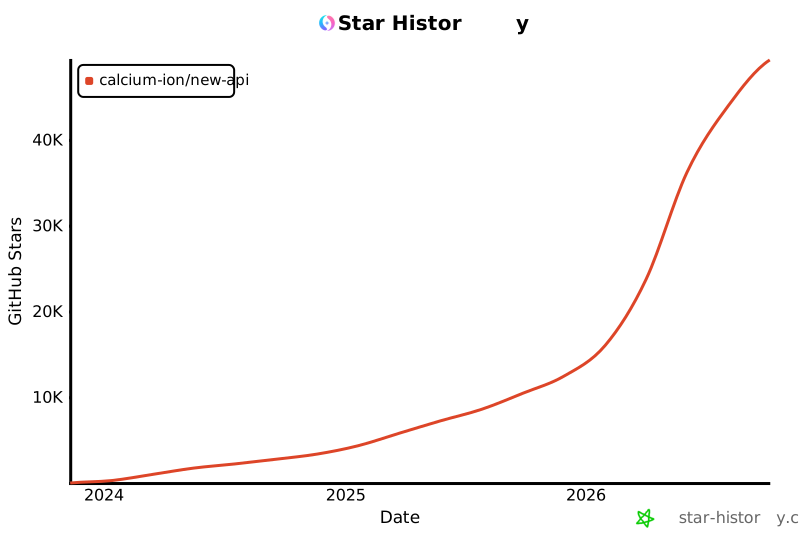](https://star-history.com/#Calcium-Ion/new-api&Date)\n\n</div>\n\n---\n\n<div align=\"center\">\n\n### 💖 Thank you for using New API\n\nIf this project is helpful to you, welcome to give us a ⭐️ Star!\n\n**[Official Documentation](https://docs.newapi.pro/en/docs)** • **[Issue Feedback](https://github.com/Calcium-Ion/new-api/issues)** • **[Latest Release](https://github.com/Calcium-Ion/new-api/releases)**\n\n<sub>Built with ❤️ by QuantumNous</sub>\n\n</div>\n"}}, "README.fr.md": {"e3eedc5d85d9775557b61802d0099fdc3dc5e8d4": {"t": 1785596163.6385777, "n": 18628, "h": "fe1b8fed96f3f301", "c": "<div align=\"center\">\n\n\n\n# New API\n\n🍥 **Passerelle de modèles étendus de nouvelle génération et système de gestion d'actifs d'IA**\n\n<p align=\"center\">\n <a href=\"./README.zh.md\">中文</a> | \n <a href=\"./README.md\">English</a> | \n <strong>Français</strong> | \n <a href=\"./README.ja.md\">日本語</a>\n</p>\n\n<p align=\"center\">\n <a href=\"https://raw.githubusercontent.com/Calcium-Ion/new-api/main/LICENSE\">\n <img src=\"https://img.shields.io/github/license/Calcium-Ion/new-api?color=brightgreen\" alt=\"licence\">\n </a>\n <a href=\"https://github.com/Calcium-Ion/new-api/releases/latest\">\n <img src=\"https://img.shields.io/github/v/release/Calcium-Ion/new-api?color=brightgreen&include_prereleases\" alt=\"version\">\n </a>\n <a href=\"https://github.com/users/Calcium-Ion/packages/container/package/new-api\">\n <img src=\"https://img.shields.io/badge/docker-ghcr.io-blue\" alt=\"docker\">\n </a>\n <a href=\"https://hub.docker.com/r/CalciumIon/new-api\">\n <img src=\"https://img.shields.io/badge/docker-dockerHub-blue\" alt=\"docker\">\n </a>\n <a href=\"https://goreportcard.com/report/github.com/Calcium-Ion/new-api\">\n <img src=\"https://goreportcard.com/badge/github.com/Calcium-Ion/new-api\" alt=\"GoReportCard\">\n </a>\n</p>\n\n<p align=\"center\">\n <a href=\"https://trendshift.io/repositories/8227\" target=\"_blank\">\n <img src=\"https://trendshift.io/api/badge/repositories/8227\" alt=\"Calcium-Ion%2Fnew-api | Trendshift\" style=\"width: 250px; height: 55px;\" width=\"250\" height=\"55\"/>\n </a>\n <br>\n <a href=\"https://hellogithub.com/repository/QuantumNous/new-api\" target=\"_blank\">\n <img src=\"https://api.hellogithub.com/v1/widgets/recommend.svg?rid=539ac4217e69431684ad4a0bab768811&claim_uid=tbFPfKIDHpc4TzR\" alt=\"Featured|HelloGitHub\" style=\"width: 250px; height: 54px;\" width=\"250\" height=\"54\" />\n </a>\n <a href=\"https://www.producthunt.com/products/new-api/launches/new-api?embed=true&utm_source=badge-featured&utm_medium=badge&utm_campaign=badge-new-api\" target=\"_blank\" rel=\"noopener noreferrer\">\n <img src=\"https://api.producthunt.com/widgets/embed-image/v1/featured.svg?post_id=1047693&theme=light&t=1769577875005\" alt=\"New API - All-in-one AI asset management gateway. | Product Hunt\" style=\"width: 250px; height: 54px;\" width=\"250\" height=\"54\" />\n </a>\n</p>\n\n<p align=\"center\">\n <a href=\"#-démarrage-rapide\">Démarrage rapide</a> •\n <a href=\"#-fonctionnalités-clés\">Fonctionnalités clés</a> •\n <a href=\"#-déploiement\">Déploiement</a> •\n <a href=\"#-documentation\">Documentation</a> •\n <a href=\"#-aide-support\">Aide</a>\n</p>\n\n</div>\n\n## 📝 Description du projet\n\n> [!NOTE] \n> Il s'agit d'un projet open-source développé sur la base de [One API](https://github.com/songquanpeng/one-api)\n\n> [!IMPORTANT] \n> - Ce projet est uniquement destiné à des fins d'apprentissage personnel, sans garantie de stabilité ni de support technique.\n> - Les utilisateurs doivent se conformer aux [Conditions d'utilisation](https://openai.com/policies/terms-of-use) d'OpenAI et aux **lois et réglementations applicables**, et ne doivent pas l'utiliser à des fins illégales.\n> - Conformément aux [《Mesures provisoires pour la gestion des services d'intelligence artificielle générative》](http://www.cac.gov.cn/2023-07/13/c_1690898327029107.htm), veuillez ne fournir aucun service d'IA générative non enregistré au public en Chine.\n\n---\n\n## 🤝 Partenaires de confiance\n\n<p align=\"center\">\n <em>Sans ordre particulier</em>\n</p>\n\n<p align=\"center\">\n <a href=\"https://www.cherry-ai.com/\" target=\"_blank\">\n <img src=\"./docs/images/cherry-studio.png\" alt=\"Cherry Studio\" height=\"80\" />\n </a>\n <a href=\"https://bda.pku.edu.cn/\" target=\"_blank\">\n <img src=\"./docs/images/pku.png\" alt=\"Université de Pékin\" height=\"80\" />\n </a>\n <a href=\"https://www.compshare.cn/?ytag=GPU_yy_gh_newapi\" target=\"_blank\">\n <img src=\"./docs/images/ucloud.png\" alt=\"UCloud\" height=\"80\" />\n </a>\n <a href=\"https://www.aliyun.com/\" target=\"_blank\">\n <img src=\"./docs/images/aliyun.png\" alt=\"Alibaba Cloud\" height=\"80\" />\n </a>\n <a href=\"https://io.net/\" target=\"_blank\">\n <img src=\"./docs/images/io-net.png\" alt=\"IO.NET\" height=\"80\" />\n </a>\n</p>\n\n---\n\n## 🙏 Remerciements spéciaux\n\n<p align=\"center\">\n <a href=\"https://www.jetbrains.com/?from=new-api\" target=\"_blank\">\n <img src=\"https://resources.jetbrains.com/storage/products/company/brand/logos/jb_beam.png\" alt=\"JetBrains Logo\" width=\"120\" />\n </a>\n</p>\n\n<p align=\"center\">\n <strong>Merci à <a href=\"https://www.jetbrains.com/?from=new-api\">JetBrains</a> pour avoir fourni une licence de développement open-source gratuite pour ce projet</strong>\n</p>\n\n---\n\n## 🚀 Démarrage rapide\n\n### Utilisation de Docker Compose (recommandé)\n\n```bash\n# Cloner le projet\ngit clone https://github.com/QuantumNous/new-api.git\ncd new-api\n\n# Modifier la configuration docker-compose.yml\nnano docker-compose.yml\n\n# Démarrer le service\ndocker-compose up -d\n```\n\n<details>\n<summary><strong>Utilisation des commandes Docker</strong></summary>\n\n```bash\n# Tirer la dernière image\ndocker pull calciumion/new-api:latest\n\n# Utilisation de SQLite (par défaut)\ndocker run --name new-api -d --restart always \\\n -p 3000:3000 \\\n -e TZ=Asia/Shanghai \\\n -v ./data:/data \\\n calciumion/new-api:latest\n\n# Utilisation de MySQL\ndocker run --name new-api -d --restart always \\\n -p 3000:3000 \\\n -e SQL_DSN=\"root:123456@tcp(localhost:3306)/oneapi\" \\\n -e TZ=Asia/Shanghai \\\n -v ./data:/data \\\n calciumion/new-api:latest\n```\n\n> **💡 Astuce:** `-v ./data:/data` sauvegardera les données dans le dossier `data` du répertoire actuel, vous pouvez également le changer en chemin absolu comme `-v /your/custom/path:/data`\n\n</details>\n\n---\n\n🎉 Après le déploiement, visitez `http://localhost:3000` pour commencer à utiliser!\n\n📖 Pour plus de méthodes de déploiement, veuillez vous référer à [Guide de déploiement](https://docs.newapi.pro/en/docs/installation)\n\n---\n\n## 📚 Documentation\n\n<div align=\"center\">\n\n### 📖 [Documentation officielle](https://docs.newapi.pro/en/docs) | [](https://deepwiki.com/QuantumNous/new-api)\n\n</div>\n\n**Navigation rapide:**\n\n| Catégorie | Lien |\n|------|------|\n| 🚀 Guide de déploiement | [Documentation d'installation](https://docs.newapi.pro/en/docs/installation) |\n| ⚙️ Configuration de l'environnement | [Variables d'environnement](https://docs.newapi.pro/en/docs/installation/config-maintenance/environment-variables) |\n| 📡 Documentation de l'API | [Documentation de l'API](https://docs.newapi.pro/en/docs/api) |\n| ❓ FAQ | [FAQ](https://docs.newapi.pro/en/docs/support/faq) |\n| 💬 Interaction avec la communauté | [Canaux de communication](https://docs.newapi.pro/en/docs/support/community-interaction) |\n\n---\n\n## ✨ Fonctionnalités clés\n\n> Pour les fonctionnalités détaillées, veuillez vous référer à [Présentation des fonctionnalités](https://docs.newapi.pro/en/docs/guide/wiki/basic-concepts/features-introduction) |\n\n### 🎨 Fonctions principales\n\n| Fonctionnalité | Description |\n|------|------|\n| 🎨 Nouvelle interface utilisateur | Conception d'interface utilisateur moderne |\n| 🌍 Multilingue | Prend en charge le chinois, l'anglais, le français, le japonais |\n| 🔄 Compatibilité des données | Complètement compatible avec la base de données originale de One API |\n| 📈 Tableau de bord des données | Console visuelle et analyse statistique |\n| 🔒 Gestion des permissions | Regroupement de jetons, restrictions de modèles, gestion des utilisateurs |\n\n### 💰 Paiement et facturation\n\n- ✅ Recharge en ligne (EPay, Stripe)\n- ✅ Tarification des modèles de paiement à l'utilisation\n- ✅ Prise en charge de la facturation du cache (OpenAI, Azure, DeepSeek, Claude, Qwen et tous les modèles pris en charge)\n- ✅ Configuration flexible des politiques de facturation\n\n### 🔐 Autorisation et sécurité\n\n- 😈 Connexion par autorisation Discord\n- 🤖 Connexion par autorisation LinuxDO\n- 📱 Connexion par autorisation Telegram\n- 🔑 Authentification unifiée OIDC\n- 🔍 Requête de quota d'utilisation de clé (avec [neko-api-key-tool](https://github.com/Calcium-Ion/neko-api-key-tool))\n\n### 🚀 Fonctionnalités avancées\n\n**Prise en charge des formats d'API:**\n- ⚡ [OpenAI Responses](https://docs.newapi.pro/en/docs/api/ai-model/chat/openai/create-response)\n- ⚡ [OpenAI Realtime API](https://docs.newapi.pro/en/docs/api/ai-model/realtime/create-realtime-session) (y compris Azure)\n- ⚡ [Claude Messages](https://docs.newapi.pro/en/docs/api/ai-model/chat/create-message)\n- ⚡ [Google Gemini](https://doc.newapi.pro/en/api/google-gemini-chat)\n- 🔄 [Modèles Rerank](https://docs.newapi.pro/en/docs/api/ai-model/rerank/create-rerank) (Cohere, Jina)\n\n**Routage intelligent:**\n- ⚖️ Sélection aléatoire pondérée des canaux\n- 🔄 Nouvelle tentative automatique en cas d'échec\n- 🚦 Limitation du débit du modèle pour les utilisateurs\n\n**Conversion de format:**\n- 🔄 **OpenAI Compatible ⇄ Claude Messages**\n- 🔄 **OpenAI Compatible → Google Gemini**\n- 🔄 **Google Gemini → OpenAI Compatible** - Texte uniquement, les appels de fonction ne sont pas encore pris en charge\n- 🚧 **OpenAI Compatible ⇄ OpenAI Responses** - En développement\n- 🔄 **Fonctionnalité de la pensée au contenu**\n\n**Prise en charge de l'effort de raisonnement:**\n\n<details>\n<summary>Voir la configuration détaillée</summary>\n\n**Modèles de la série OpenAI :**\n- `o3-mini-high` - Effort de raisonnement élevé\n- `o3-mini-medium` - Effort de raisonnement moyen\n- `o3-mini-low` - Effort de raisonnement faible\n- `gpt-5-high` - Effort de raisonnement élevé\n- `gpt-5-medium` - Effort de raisonnement moyen\n- `gpt-5-low` - Effort de raisonnement faible\n\n**Modèles de pensée de Claude:**\n- `claude-3-7-sonnet-20250219-thinking` - Activer le mode de pensée\n\n**Modèles de la série Google Gemini:**\n- `gemini-2.5-flash-thinking` - Activer le mode de pensée\n- `gemini-2.5-flash-nothinking` - Désactiver le mode de pensée\n- `gemini-2.5-pro-thinking` - Activer le mode de pensée\n- `gemini-2.5-pro-thinking-128` - Activer le mode de pensée avec budget de pensée de 128 tokens\n- Vous pouvez également ajouter les suffixes `-low`, `-medium` ou `-high` aux modèles Gemini pour fixer le niveau d’effort de raisonnement (sans suffixe de budget supplémentaire).\n\n</details>\n\n---\n\n## 🤖 Prise en charge des modèles\n\n> Pour les détails, veuillez vous référer à [Documentation de l'API - Interface de relais](https://docs.newapi.pro/en/docs/api)\n\n| Type de modèle | Description | Documentation |\n|---------|------|------|\n| 🤖 OpenAI-Compatible | Modèles compatibles OpenAI | [Documentation](https://docs.newapi.pro/en/docs/api/ai-model/chat/openai/createchatcompletion) |\n| 🤖 OpenAI Responses | Format OpenAI Responses | [Documentation](https://docs.newapi.pro/en/docs/api/ai-model/chat/openai/createresponse) |\n| 🎨 Midjourney-Proxy | [Midjourney-Proxy(Plus)](https://github.com/novicezk/midjourney-proxy) | [Documentation](https://doc.newapi.pro/api/midjourney-proxy-image) |\n| 🎵 Suno-API | [Suno API](https://github.com/Suno-API/Suno-API) | [Documentation](https://doc.newapi.pro/api/suno-music) |\n| 🔄 Rerank | Cohere, Jina | [Documentation](https://docs.newapi.pro/en/docs/api/ai-model/rerank/creatererank) |\n| 💬 Claude | Format Messages | [Documentation](https://docs.newapi.pro/en/docs/api/ai-model/chat/createmessage) |\n| 🌐 Gemini | Format Google Gemini | [Documentation](https://docs.newapi.pro/en/docs/api/ai-model/chat/gemini/geminirelayv1beta) |\n| 🔧 Dify | Mode ChatFlow | - |\n| 🎯 Personnalisé | Prise en charge de l'adresse d'appel complète | - |\n\n### 📡 Interfaces prises en charge\n\n<details>\n<summary>Voir la liste complète des interfaces</summary>\n\n- [Interface de discussion (Chat Completions)](https://docs.newapi.pro/en/docs/api/ai-model/chat/openai/createchatcompletion)\n- [Interface de réponse (Responses)](https://docs.newapi.pro/en/docs/api/ai-model/chat/openai/createresponse)\n- [Interface d'image (Image)](https://docs.newapi.pro/en/docs/api/ai-model/images/openai/post-v1-images-generations)\n- [Interface audio (Audio)](https://docs.newapi.pro/en/docs/api/ai-model/audio/openai/create-transcription)\n- [Interface vidéo (Video)](https://docs.newapi.pro/en/docs/api/ai-model/audio/openai/createspeech)\n- [Interface d'incorporation (Embeddings)](https://docs.newapi.pro/en/docs/api/ai-model/embeddings/createembedding)\n- [Interface de rerank (Rerank)](https://docs.newapi.pro/en/docs/api/ai-model/rerank/creatererank)\n- [Conversation en temps réel (Realtime)](https://docs.newapi.pro/en/docs/api/ai-model/realtime/createrealtimesession)\n- [Discussion Claude](https://docs.newapi.pro/en/docs/api/ai-model/chat/createmessage)\n- [Discussion Google Gemini](https://docs.newapi.pro/en/docs/api/ai-model/chat/gemini/geminirelayv1beta)\n\n</details>\n\n---\n\n## 🚢 Déploiement\n\n> [!TIP]\n> **Dernière image Docker:** `calciumion/new-api:latest`\n\n### 📋 Exigences de déploiement\n\n| Composant | Exigence |\n|------|------|\n| **Base de données locale** | SQLite (Docker doit monter le répertoire `/data`)|\n| **Base de données distante | MySQL ≥ 5.7.8 ou PostgreSQL ≥ 9.6 |\n| **Moteur de conteneur** | Docker / Docker Compose |\n\n### ⚙️ Configuration des variables d'environnement\n\n<details>\n<summary>Configuration courante des variables d'environnement</summary>\n\n| Nom de variable | Description | Valeur par défaut |\n|--------|------|--------|\n| `SESSION_SECRET` | Secret de session (requis pour le déploiement multi-machines) |\n| `CRYPTO_SECRET` | Secret de chiffrement (requis pour Redis) | - |\n| `SQL_DSN` | Chaine de connexion à la base de données | - |\n| `REDIS_CONN_STRING` | Chaine de connexion Redis | - |\n| `STREAMING_TIMEOUT` | Délai d'expiration du streaming (secondes) | `300` |\n| `STREAM_SCANNER_MAX_BUFFER_MB` | Taille max du buffer par ligne (Mo) pour le scanner SSE ; à augmenter quand les sorties image/base64 sont très volumineuses (ex. images 4K) | `64` |\n| `MAX_REQUEST_BODY_MB` | Taille maximale du corps de requête (Mo, comptée **après décompression** ; évite les requêtes énormes/zip bombs qui saturent la mémoire). Dépassement ⇒ `413` | `32` |\n| `AZURE_DEFAULT_API_VERSION` | Version de l'API Azure | `2025-04-01-preview` |\n| `ERROR_LOG_ENABLED` | Interrupteur du journal d'erreurs | `false` |\n| `PYROSCOPE_URL` | Adresse du serveur Pyroscope | - |\n| `PYROSCOPE_APP_NAME` | Nom de l'application Pyroscope | `new-api` |\n| `PYROSCOPE_BASIC_AUTH_USER` | Utilisateur Basic Auth Pyroscope | - |\n| `PYROSCOPE_BASIC_AUTH_PASSWORD` | Mot de passe Basic Auth Pyroscope | - |\n| `PYROSCOPE_MUTEX_RATE` | Taux d'échantillonnage mutex Pyroscope | `5` |\n| `PYROSCOPE_BLOCK_RATE` | Taux d'échantillonnage block Pyroscope | `5` |\n| `HOSTNAME` | Nom d'hôte tagué pour Pyroscope | `new-api` |\n\n📖 **Configuration complète:** [Documentation des variables d'environnement](https://docs.newapi.pro/en/docs/installation/config-maintenance/environment-variables)\n\n</details>\n\n### 🔧 Méthodes de déploiement\n\n<details>\n<summary><strong>Méthode 1: Docker Compose (recommandé)</strong></summary>\n\n```bash\n# Cloner le projet\ngit clone https://github.com/QuantumNous/new-api.git\ncd new-api\n\n# Modifier la configuration\nnano docker-compose.yml\n\n# Démarrer le service\ndocker-compose up -d\n```\n\n</details>\n\n<details>\n<summary><strong>Méthode 2: Commandes Docker</strong></summary>\n\n**Utilisation de SQLite:**\n```bash\ndocker run --name new-api -d --restart always \\\n -p 3000:3000 \\\n -e TZ=Asia/Shanghai \\\n -v ./data:/data \\\n calciumion/new-api:latest\n```\n\n**Utilisation de MySQL:**\n```bash\ndocker run --name new-api -d --restart always \\\n -p 3000:3000 \\\n -e SQL_DSN=\"root:123456@tcp(localhost:3306)/oneapi\" \\\n -e TZ=Asia/Shanghai \\\n -v ./data:/data \\\n calciumion/new-api:latest\n```\n\n> **💡 Explication du chemin:** \n> - `./data:/data` - Chemin relatif, données sauvegardées dans le dossier data du répertoire actuel\n> - Vous pouvez également utiliser un chemin absolu, par exemple : `/your/custom/path:/data`\n\n</details>\n\n<details>\n<summary><strong>Méthode 3: Panneau BaoTa</strong></summary>\n\n1. Installez le panneau BaoTa (version ≥ 9.2.0)\n2. Recherchez **New-API** dans le magasin d'applications\n3. Installation en un clic\n\n📖 [Tutoriel avec des images](./docs/BT.md)\n\n</details>\n\n### ⚠️ Considérations sur le déploiement multi-machines\n\n> [!WARNING]\n> - **Doit définir** `SESSION_SECRET` - Sinon l'état de connexion sera incohérent sur plusieurs machines\n> - **Redis partagé doit définir** `CRYPTO_SECRET` - Sinon les données ne pourront pas être déchiffrées\n\n### 🔄 Nouvelle tentative de canal et cache\n\n**Configuration de la nouvelle tentative:** `Paramètres → Paramètres de fonctionnement → Paramètres généraux → Nombre de tentatives en cas d'échec`\n\n**Configuration du cache:**\n- `REDIS_CONN_STRING`: Cache Redis (recommandé)\n- `MEMORY_CACHE_ENABLED`: Cache mémoire\n\n---\n\n## 🔗 Projets connexes\n\n### Projets en amont\n\n| Projet | Description |\n|------|------|\n| [One API](https://github.com/songquanpeng/one-api) | Base du projet original |\n| [Midjourney-Proxy](https://github.com/novicezk/midjourney-proxy) | Prise en charge de l'interface Midjourney |\n\n### Outils d'accompagnement\n\n| Projet | Description |\n|------|------|\n| [neko-api-key-tool](https://github.com/Calcium-Ion/neko-api-key-tool) | Outil de recherche de quota d'utilisation avec une clé |\n| [new-api-horizon](https://github.com/Calcium-Ion/new-api-horizon) | Version optimisée haute performance de New API |\n\n---\n\n## 💬 Aide et support\n\n### 📖 Ressources de documentation\n\n| Ressource | Lien |\n|------|------|\n| 📘 FAQ | [FAQ](https://docs.newapi.pro/en/docs/support/faq) |\n| 💬 Interaction avec la communauté | [Canaux de communication](https://docs.newapi.pro/en/docs/support/community-interaction) |\n| 🐛 Commentaires sur les problèmes | [Commentaires sur les problèmes](https://docs.newapi.pro/en/docs/support/feedback-issues) |\n| 📚 Documentation complète | [Documentation officielle](https://docs.newapi.pro/en/docs) |\n\n### 🤝 Guide de contribution\n\nBienvenue à toutes les formes de contribution!\n\n- 🐛 Signaler des bogues\n- 💡 Proposer de nouvelles fonctionnalités\n- 📝 Améliorer la documentation\n- 🔧 Soumettre du code\n\n---\n\n## 🌟 Historique des étoiles\n\n<div align=\"center\">\n\n[](https://star-history.com/#Calcium-Ion/new-api&Date)\n\n</div>\n\n---\n\n<div align=\"center\">\n\n### 💖 Merci d'utiliser New API\n\nSi ce projet vous est utile, bienvenue à nous donner une ⭐️ Étoile!\n\n**[Documentation officielle](https://docs.newapi.pro/en/docs)** • **[Commentaires sur les problèmes](https://github.com/Calcium-Ion/new-api/issues)** • **[Dernière version](https://github.com/Calcium-Ion/new-api/releases)**\n\n<sub>Construit avec ❤️ par QuantumNous</sub>\n\n</div>\n"}}}} |